
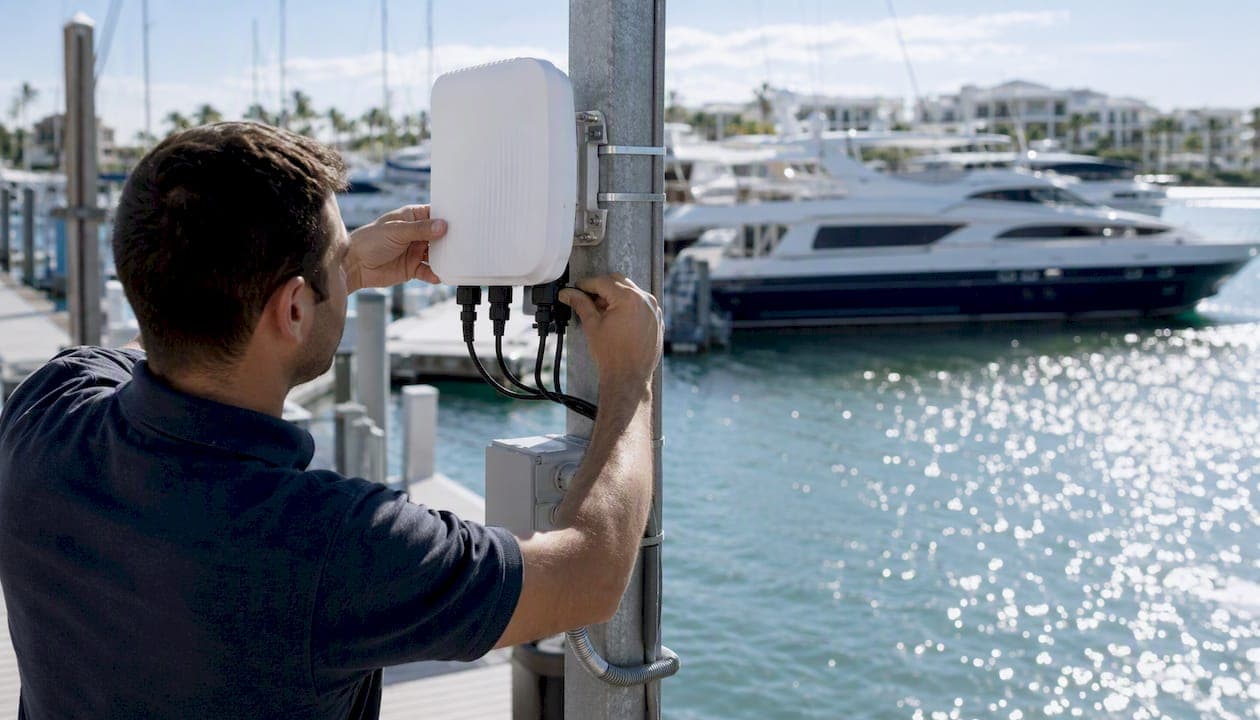
A reliable marina wifi network is a purpose-built, professionally planned system that combines outdoor-rated access points, resilient backhaul, and clear operational policies. The single highest-impact first step is a proper site survey. Skip it, and no amount of hardware spending will fix dead zones caused by water reflections, metal hulls, and dock geometry that a land-based network never has to deal with.
Before calling any vendor, do three things:
- Run a site survey. Map dock layout, slip count, existing dead zones, and interference sources.
- Choose outdoor-rated APs plus resilient backhaul. Marine-grade hardware and a redundant internet feed matter more than any single device spec.
- Set guest policies and a captive portal. Decide bandwidth limits, VLANs, and how boaters pay for access before installation day.
Pro Tip: Before requesting quotes, gather your site map, expected peak concurrent users, and current upstream bandwidth. Vendors who ask for this data upfront are the ones who design properly; vendors who skip straight to a price are the ones who sell you a single box and disappear.
Key Takeaways
A reliable marina WiFi network depends on a professional site survey, marine-rated hardware, resilient backhaul, and network segmentation working together as one system, not as separate purchases.
| Point | Details |
|---|---|
| Survey before you buy | A site survey with heatmaps and interference scans should precede any hardware decision or vendor quote. |
| Match hardware to distance and load | Outdoor APs, point-to-point bridges, and cellular bonding each solve a different range or reliability problem, not the same one. |
| Backhaul redundancy comes first | Pairing fiber or cable with cellular failover, or using Starlink where no wired option exists, matters more than any single access point spec. |
| Segment guest and operational traffic | Guest WiFi and systems like POS or cameras need separate VLANs with WPA3 and client isolation. |
| Tie WiFi into marina operations | Platforms like Atlantis Marina connect captive-portal payments, boater accounts, and analytics so guest WiFi becomes a revenue and efficiency tool, not just an amenity. |
Table of Contents
- Why Is Marina WiFi So Much Harder Than Land-Based Networks?
- How Do You Design a Marina WiFi Network That Actually Works?
- Which Hardware Actually Handles a Marina Environment?
- What's the Right Backhaul for a Marina Network?
- What Does Proper Marina WiFi Installation Look Like?
- How Should You Manage Guest Access, Security, and Payments?
- How Often Should You Maintain and Troubleshoot a Marina Network?
- What Should You Ask Before Hiring a Marina WiFi Vendor?
- How Does WiFi Fit Into the Bigger Picture of Marina Operations?
- What's the Fastest Path to a Reliable Marina Network?
- What Do Dockmasters Actually See When the Network Fails?
- How Atlantis Marina Ties Your WiFi Network to Daily Operations
- Sources
- FAQ
Why Is Marina WiFi So Much Harder Than Land-Based Networks?
Water reflects radio signals instead of absorbing them, which means a marina fights multipath interference that an office building or apartment complex never encounters. Signals bounce off the surface, arrive at a device slightly delayed, and cancel each other out. Add rows of metal hulls acting as unpredictable reflectors and shields, and a single access point that would cover a hundred-yard warehouse aisle without issue might barely reach the third slip down the dock.
Distance compounds the problem. Marinas spread devices across open water and long pontoons, often 200 to 400 meters from the nearest clubhouse or equipment room, depending on basin shape and dock configuration, according to Purple's marina and yacht club coverage data. That is far beyond the range of a standard indoor router, and it is why sector antennas and point-to-point bridges show up in nearly every professional marina deployment.
Then there is density. A single 40-slip marina on a summer weekend can have many connected devices simultaneously, including boat owners, their guests, and staff systems, all trying to stream video, sync cloud backups, or run point-of-sale terminals simultaneously. Underpowered consumer routers were never built to sustain that concurrent load, and Seabits' technical breakdown of common marina WiFi failures points to exactly this mix of reflections, obstructions, and device density as the core reason so many marina networks underperform right out of the gate.
Weather and corrosion add a third layer. Salt air, humidity, and temperature swings degrade unsealed connectors and consumer-grade plastics within a season or two, which is why every credible marina installer insists on marine-rated enclosures from day one.
How Do You Design a Marina WiFi Network That Actually Works?
Start with a site survey and a capacity plan, not a hardware order. Skipping this step is the single most common reason marina networks fail to meet expectations within the first year.
A proper survey, following the approach outlined by Beacon WiFi's marina design guidance, produces four concrete deliverables:
- A coverage heatmap showing signal strength at every slip, including seasonal changes from boat traffic and dock modifications.
- An interference scan identifying competing 2.4GHz and 5GHz signals from neighboring properties, marine electronics, and existing equipment.
- A power and backhaul map marking every point where you can run PoE, mount conduit, or tie into existing fiber or cable runs.
- Mounting and anchor points for antennas, sector radios, and bridge links, verified for structural load and line-of-sight.
Capacity planning follows the survey. A workable starting formula: assume 1.5 to 2 connected devices per occupied slip on a normal day, and 3 to 4 during peak weekends or regatta events. If you budget 2 Mbps per device for basic browsing and messaging, and 8 to 10 Mbps for a device actively streaming video, a 60-slip marina at peak occupancy with moderate streaming can realistically demand 400 to 600 Mbps of aggregate throughput. That number should drive your backhaul decision more than any single access point's advertised speed.
Before you contact a single vendor, assemble this checklist:
- Total slip count and dock layout, including any planned expansion.
- Expected peak concurrent users, broken out by season.
- Current upstream bandwidth and provider contract terms.
- Existing electrical infrastructure at each dock and pole.
- Any known dead zones from a previous network, with notes on cause.
Which Hardware Actually Handles a Marina Environment?
Enterprise-grade outdoor access points make sense for the core dock and clubhouse coverage of most marinas. Point-to-point bridges take over where you need to reach a remote pier or an outbuilding without trenching cable across water. Cellular failover devices protect you when the primary line drops, and boat-side receivers help individual owners squeeze more signal out of a network that's already well designed. None of these categories replaces the others. They stack.

Wave WiFi focuses on the boat owner's side of the equation: long-range marine receivers and antennas that pull in a marginal shore signal and rebroadcast it cleanly inside the cabin. Their boat-side boosting guidance is genuinely useful for individual boaters, but it works best as a complement to a well-designed shore network, not a substitute for one.
GNS Wireless operates on the other end, handling full commercial design and installation with wireless bridges and outdoor-rated equipment built specifically for docks and harbors. Their installation methodology treats coverage planning and bridge links as the backbone of the project rather than an afterthought.
Ubiquiti, through its UniFi line of outdoor access points, shows up in a large share of marina projects because of its price point and the sheer number of installers who already know the ecosystem. It's a reasonable fit for a marina willing to self-manage its network or lean on a local IT contractor rather than a marine specialist.
Cambium Networks builds industrial point-to-point and point-to-multipoint radios for exactly the kind of long-range backhaul a remote pier or satellite dock field needs, where running fiber isn't practical.
Peplink, through its Pepwave hardware, handles cellular bonding and multi-WAN failover, which matters enormously for marinas that can't get reliable fiber and need to combine multiple cellular carriers into one stable connection.
Starlink has become a legitimate upstream option for marinas in areas without fiber or cable, delivering strong throughput where no wired alternative exists, though installers should account for its latency profile and its own mounting and alignment requirements.
None of this hardware operates in a vacuum. The access points and bridges handle radio coverage, but the software layer decides what happens when a boater's phone actually connects. A cloud-based management platform that ties the captive portal to boater accounts, billing, and analytics, the kind of integration Atlantis Marina's marina management platform provides, turns a WiFi network from a cost center into an operational asset. That distinction becomes clearer once you look at how backhaul and guest management decisions interact.
What's the Right Backhaul for a Marina Network?
Backhaul resilience is the single most important factor in guest experience after coverage placement itself. You can have flawless access point coverage on every dock and still deliver a miserable experience if the pipe feeding those access points drops every time a squall rolls through or three boats start streaming at once.
Fiber is the gold standard where it's available: high throughput, low latency, and generally stable in weather that would knock out a wireless link. The tradeoff is installation cost and timeline, especially for marinas in older harbor districts where trenching permits can take months. Cable service works as a reasonable middle ground, cheaper to install than fiber but with less consistent upload speeds, which matters for a marina running cloud-based POS or camera systems.
Point-to-point microwave bridges solve the problem of reaching a remote pier or an outbuilding without digging across the property. They're a staple of professional marina design, as GNS Wireless's own installation approach demonstrates, but they need clean line-of-sight and periodic realignment after storms.
Starlink fills the gap for marinas with no wired infrastructure at all, delivering meaningful throughput where fiber and cable simply don't reach. Latency runs higher than fiber and installers need to plan for open-sky mounting, but for a remote slip field or an island marina, it's often the only realistic upstream option.
Cellular bonding through Peplink hardware adds resilience rather than raw speed, combining multiple SIM connections into one stable failover path so a fiber outage doesn't take the whole guest network down with it.
| Backhaul type | Typical throughput | Latency | Relative cost | Best use case |
|---|---|---|---|---|
| Fiber | High (hundreds of Mbps to multi-Gbps) | Low | High upfront, low ongoing | Primary backhaul where available |
| Cable | Moderate to high | Low to moderate | Moderate | Primary backhaul, budget-conscious |
| Microwave P2P | Moderate to high | Low | Moderate to high install | Remote piers, outbuildings |
| Starlink | High | Higher than wired | Moderate hardware, ongoing service fee | No wired option available |
| Cellular bonding | Variable, carrier-dependent | Moderate | Moderate | Failover, redundancy layer |
A practical decision matrix: if you have fiber or cable, make it primary and add cellular bonding as failover. If you don't, evaluate Starlink against microwave bridges based on whether you have line-of-sight to an existing network hub. Either way, never deploy a marina network on a single upstream connection with no failover path. One storm-related outage on a summer holiday weekend will generate more complaints than a year of minor coverage gaps.
- Fiber or cable as primary, cellular bonding as automatic failover: the most resilient combination for most marinas.
- Starlink as primary where no wired option exists, with cellular bonding as backup.
- Microwave P2P to extend primary backhaul to remote piers, never as the sole connection for the main dock.
What Does Proper Marina WiFi Installation Look Like?
Durable mounting and correct grounding prevent more outages and warranty claims than any other single factor in a marina deployment. Installers who skip grounding to save an afternoon of labor are setting up a service call for the following season.
Mounting height and placement matter more on water than on land, because reflections off the surface change how a signal propagates. Pole-mounted sector antennas typically go up 15 to 25 feet above the dock, aimed to minimize water-surface bounce while still covering the full slip run. Roof mounting on a clubhouse or harbor office works for shorter-range coverage but needs clear line-of-sight past any nearby masts or rigging that could obstruct the signal path during peak season when more boats are docked.
Cabling should run through sealed conduit, never exposed along a dock where foot traffic, boat lines, and seasonal ice can damage it. Every outdoor connector needs a weatherproof seal, and every cable run benefits from drip loops to keep water from tracking into equipment housings.
Power delivery follows its own rules in a marine environment. PoE (Power over Ethernet) simplifies dock-side installations by eliminating the need for separate electrical runs to each access point, but injectors need surge protection given how exposed dock wiring is to lightning strikes near open water. For longer dock runs, a dedicated transformer or shore-power tap, properly grounded, keeps voltage stable across distance.
Corrosion control separates a network that lasts five years from one that fails in eighteen months. Stainless steel brackets, sealed grommets on every cable entry point, and an IP66 or higher rating on outdoor enclosures are non-negotiable in salt air environments, a point Madgig Networks' marina WiFi documentation emphasizes as a primary driver of premature equipment failure.
- Mount sector antennas 15 to 25 feet up, aimed to minimize water-surface reflection.
- Run all dock cabling through sealed conduit with drip loops at every connection.
- Use PoE with surge protection on every injector near open water.
- Specify stainless brackets and IP66-or-higher enclosures for anything mounted outdoors.
- Ground every pole-mounted antenna independently, not through a shared circuit.
Pro Tip: Experienced marina installers dab a thin layer of dielectric grease on every outdoor connector before sealing it, even ones rated for weather exposure. It's a five-minute step per connection that adds years to hardware life in salt air, and it's the difference most manufacturer warranties never mention.
How Should You Manage Guest Access, Security, and Payments?
Segment guest traffic from operational systems, and put anything sensitive, point-of-sale terminals, security cameras, boat lift controllers, on its own VLAN with stricter access rules. Mixing guest WiFi with the network running your billing system or camera feeds is the single most common security mistake marinas make.
A typical captive-portal payment flow works like this: a boater's device connects to the marina's guest SSID and gets redirected to a landing page. QR-code signage at the dock, similar to the payment-enabled dock rate signs Comfort House produces for marina use, lets a visitor scan directly into that portal without hunting for a network name. From there, the portal collects payment, either a day pass or a recurring guest rate, and grants access tied to that transaction. Done well, this converts a walk-up visitor into a paying guest account in under a minute, with no staff intervention required.
Security fundamentals for a marina network:
- Use WPA3 encryption where your hardware supports it, and WPA2 as a minimum elsewhere.
- Enable client isolation on guest networks so one boater's device can't see or probe another's.
- Keep firmware current on every access point, bridge, and router. Outdated firmware is the most common entry point for network compromise.
- Put IoT devices, cameras, sensors, boat lift controllers, on a dedicated VLAN with tightly scoped firewall rules.
- Set up remote monitoring so you know about an outage before a boater calls to report it.
The real efficiency gain comes from tying this guest flow into your marina management system rather than running the captive portal as an isolated tool. When a boater's WiFi login connects to the same account record as their slip reservation and billing profile, tools like Atlantis Marina's boater account platform let staff see who's connected, what they've paid, and what services they've used, all in one dashboard instead of three disconnected systems. That kind of integration also opens the door to smart device coordination across the property, which is where camera and sensor networks tend to plug in as well, as covered in Atlantis Marina's IoT integration guidance.
How Often Should You Maintain and Troubleshoot a Marina Network?
Regular monitoring and firmware discipline prevent the vast majority of service calls before they happen. Most marina WiFi complaints trace back to a firmware issue, a loose connector, or an upstream outage that went unnoticed for days, not a fundamental design flaw.
A realistic maintenance calendar:
- Daily: Automated health checks through remote monitoring, flagging any access point that's gone offline or is showing unusual load.
- Weekly: Manual review of bandwidth usage patterns and any recurring guest complaints logged by staff.
- Monthly: Firmware update checks across all access points, bridges, and routers, applied during low-traffic windows.
- Seasonally: Physical inspection of every mount, connector, and enclosure for corrosion, loose hardware, or storm damage, ideally before and after peak season.
When something breaks, isolate the problem before calling anyone. Run a speed test directly from the upstream connection first, bypassing the WiFi entirely, to confirm whether the issue is your internet feed or your local network. If upstream looks healthy, ping the affected access point directly to see if it's reachable. Check the PoE injector for power delivery, since a failing injector is a frequent, easily missed cause of a "dead" access point that still has intact cabling. Finally, physically inspect the mounting and connectors for storm damage or corrosion.
Escalate to your vendor or installer when the issue persists after these steps, and come prepared with specifics: which access point or bridge is affected, what the speed test showed, when the problem started, and whether it correlates with weather or peak occupancy. That information cuts diagnostic time dramatically compared to a vague "the WiFi is down" call.
What Should You Ask Before Hiring a Marina WiFi Vendor?
Choose an installer who performs a genuine site survey and delivers a heatmap and capacity plan, not one who shows up with a single box and a standard quote. That distinction alone filters out most of the vendors who will disappoint you within a year.
During procurement, ask every candidate:
- Can you walk me through your site survey process and show me a sample heatmap from a previous marina project?
- What IP rating and corrosion protections does your hardware carry, and what's covered under warranty if it fails?
- What's your service-level agreement for response time on an outage?
- Do you provide remote monitoring tools, and can my staff access them directly?
- Can I speak with a reference marina of similar size that you've installed for?
Red flags that should end a conversation quickly: a vendor who quotes a price before seeing your site, hardware with no marine-specific rating, a warranty that excludes corrosion damage (a near-guarantee of failure near saltwater), and vague answers about what happens after installation day.
Pricing varies enormously by scope, but the main cost drivers are consistent across projects: backhaul type (microwave bridges and Starlink installations cost more upfront than a straightforward fiber tap), the number of access points required for full coverage, pole-mounting versus simpler wall or roof mounts, and whether point-to-point links are needed to reach remote piers. A small yacht club with fifteen slips and clean line-of-sight to a clubhouse will land at a fundamentally different price point than a hundred-slip public marina with scattered outbuildings and no existing fiber.
How Does WiFi Fit Into the Bigger Picture of Marina Operations?
A well-integrated WiFi network becomes an operational tool, not just an amenity, when it handles guest onboarding, payments, presence detection, and analytics in one connected system. Marinas that treat WiFi as an isolated utility miss most of the value a modern network can generate.
The practical benefits show up fast once WiFi ties into your broader operations:
- Automated payments at the dock. A boater scans a QR code, pays through the captive portal, and their transaction posts directly to the marina's billing system without a staff member touching a terminal.
- Faster check-in. Returning boaters whose devices auto-connect to the guest network can be recognized and matched to their reservation the moment they arrive, cutting down on front-desk lines during peak arrival windows.
- Presence-aware services. Knowing which slips have an active connected device helps staff estimate real-time occupancy far more accurately than a paper log, feeding into automated guest notifications like the workflows described in Atlantis Marina's guest notification guidance.
- Analytics-driven berth utilization. Connection data over a season reveals which slips see heavy transient traffic versus long-term occupancy, informing pricing and marketing decisions.
Consider a mid-sized marina running a regatta weekend: three hundred visiting boats need temporary WiFi access, dock rate payment, and a way to reach the ship store without a line forming at a single register. A captive portal tied to Atlantis Marina's ship store POS lets a boater pay for both dock access and a case of ice through the same account, while staff track the entire event's revenue in one dashboard instead of reconciling three separate systems afterward.
When you're scoping an integration project, ask your software vendor directly: does the platform support QR-based account linking at the point of connection, can guest WiFi payments sync automatically with your billing system, and what analytics does the platform surface on device presence and slip utilization. Those three questions separate a genuine integration from a system that just happens to sit next to your network.
What's the Fastest Path to a Reliable Marina Network?
Following a structured rollout, rather than buying hardware piecemeal as problems appear, reduces both complaints and outages faster than any other approach. Marinas that skip straight to equipment purchases without a plan tend to spend more money solving the same problems twice.
- Run a baseline speed test and document current dead zones, so you have a clear before-and-after comparison once the new network is live.
- Schedule a professional site survey that produces a heatmap, interference scan, and capacity plan specific to your dock layout.
- Secure at least two vendor quotes, using the procurement questions above to compare proposals on substance rather than price alone.
- Plan backhaul redundancy before finalizing hardware, deciding whether fiber, Starlink, or cellular bonding will serve as primary and backup.
- Procure marine-rated hardware matched to your capacity plan, not the cheapest access point that technically covers the square footage.
- Install and tune the network, verifying coverage against the original heatmap before calling the project complete.
- Set a monitoring and maintenance SLA with your installer or IT team, so firmware updates and health checks happen on schedule rather than reactively.
Each step builds on the last, and skipping the survey to save a week almost always costs more time later in troubleshooting calls and unhappy boaters. A marina that follows this sequence typically sees fewer complaint calls within the first season and a network that holds up through peak weekends instead of buckling under regatta-day load.
What Do Dockmasters Actually See When the Network Fails?
The network usually breaks on the day you can least afford it, and that's the lesson every dockmaster learns the hard way after their first regatta weekend. Coverage that looked perfectly adequate on a quiet Tuesday can collapse the moment 150 extra boats show up and every guest tries to stream a race broadcast at the same time.
One recurring pattern from busy weekends: the complaints rarely come in as "the WiFi is slow." They come in as three or four separate issues, a card reader that won't process a payment, a guest who can't check email, a camera feed that drops, that all trace back to the same overloaded backhaul connection. Figuring out that they're one problem instead of three saves an enormous amount of troubleshooting time during a chaotic weekend.
Another lesson: guests forgive a slow connection far more easily than they forgive being unable to pay for their slip. A captive portal that ties directly into account and billing records turns a frustrating connectivity issue into a minor inconvenience, because at least the transaction goes through.
Heading into next season, the first item on the list isn't new hardware. It's pulling last year's peak-weekend logs and matching them against the current capacity plan, because the marina that grew by fifteen slips over the winter needs a network sized for this year's demand, not last year's.
How Atlantis Marina Ties Your WiFi Network to Daily Operations
Getting the hardware and backhaul right solves connectivity. Getting the software right turns that connectivity into revenue and time saved for your staff. A marina running captive-portal payments, boater accounts, and guest provisioning through one connected platform sees less friction at check-in and a real lift in per-guest spending, because every touchpoint from WiFi login to ship store purchase feeds the same billing record instead of three disconnected systems.
Atlantis Marina's marina management platform is built to sit behind exactly this kind of network. QR-code account linking means a boater who scans in at the dock is instantly recognized, tied to their reservation, and ready to pay through Stripe or ACH without a staff member touching a terminal. The boater account platform carries that same identity across the app, the web portal, and the dock, so a guest's WiFi session, their slip reservation, and their ship store purchase all live under one account. Billing automation through Atlantis Marina's billing tools means guest WiFi tiers and day-pass charges post automatically, with no manual entry required at month's end.
If you're planning a network upgrade this season, the smartest next step is pairing your hardware procurement with a review of how your captive portal will talk to your operations software. Request a demo of Atlantis Marina to see how QR-based check-in and automated billing could plug into the network you're about to build.
Sources
For a deeper technical review of site survey methodology and equipment selection, Beacon WiFi's design and planning guide walks through heatmapping and bandwidth planning step by step. GNS Wireless's installation page is a useful reference for bridge-link design and coverage optimization on working docks.
Boat owners looking to improve on-vessel reception should start with Wave WiFi's boosting guide, which covers receiver and antenna placement in plain terms. For understanding why so many marina networks underperform in the first place, Seabits' technical breakdown remains one of the clearest explanations available. For captive-portal signage examples that pair QR payment codes with dock rate information, see Comfort House's marina dock rate signs.
- Marina WiFi Installation | Reliable Dock & Harbor Internet Solutions — GNS Wireless
- How to Design and Plan Wifi in a Marina — Beacon Wifi
- How to Boost Marina WiFi on Your Boat — Wave WiFi
- Marina WiFi is hard — Seabits
- Marina & Yacht Club WiFi: Pontoon Coverage & Tiers — Purple
- Marina dock rate sign — Comfort House
FAQ
How do I get WiFi on my boat while docked at a marina?
Most marinas broadcast a guest network you connect to directly, but signal strength at your slip depends on distance from the nearest access point and hull interference. A long-range marine receiver, like those Wave WiFi produces, can significantly improve reception if your slip sits at the edge of coverage.
What is the best WiFi option for a boat at a marina?
The best setup pairs a well-designed shore-side network, ideally with marine-rated outdoor access points and resilient backhaul, with a boat-side receiver that boosts and rebroadcasts that signal inside the cabin. Neither piece fully substitutes for the other.
Can I get portable WiFi without relying on the marina's network?
Yes, a cellular hotspot or a Peplink device with cellular bonding gives you an independent connection that doesn't depend on marina infrastructure, though it comes with data costs and coverage limits based on carrier signal in your area.
Can you get WiFi if you live on a boat full time?
Full-time liveaboards typically combine marina WiFi where available with a dedicated cellular router for reliability, since marina networks can get congested during peak season and aren't designed to be a resident's sole connection. Platforms that integrate guest WiFi with billing and account management, like Atlantis Marina, can also simplify how long-term residents manage recurring access charges.
How do I access marina WiFi if the signal seems weak?
Move closer to the posted access point locations if possible, check whether the marina offers a captive portal login that might be throttling unauthenticated devices, and consider a boat-side signal booster if the weak signal persists across your entire stay.