
Marina insurance document tracking, as used in marina management software, means collecting boater-uploaded certificates, storing them in a central platform, monitoring expiration dates, verifying coverage details, and enforcing compliance through billing rules and access controls. Start now by taking these four steps:
- Require upload at onboarding. Make certificate of insurance (COI) submission a condition of slip assignment, not an afterthought.
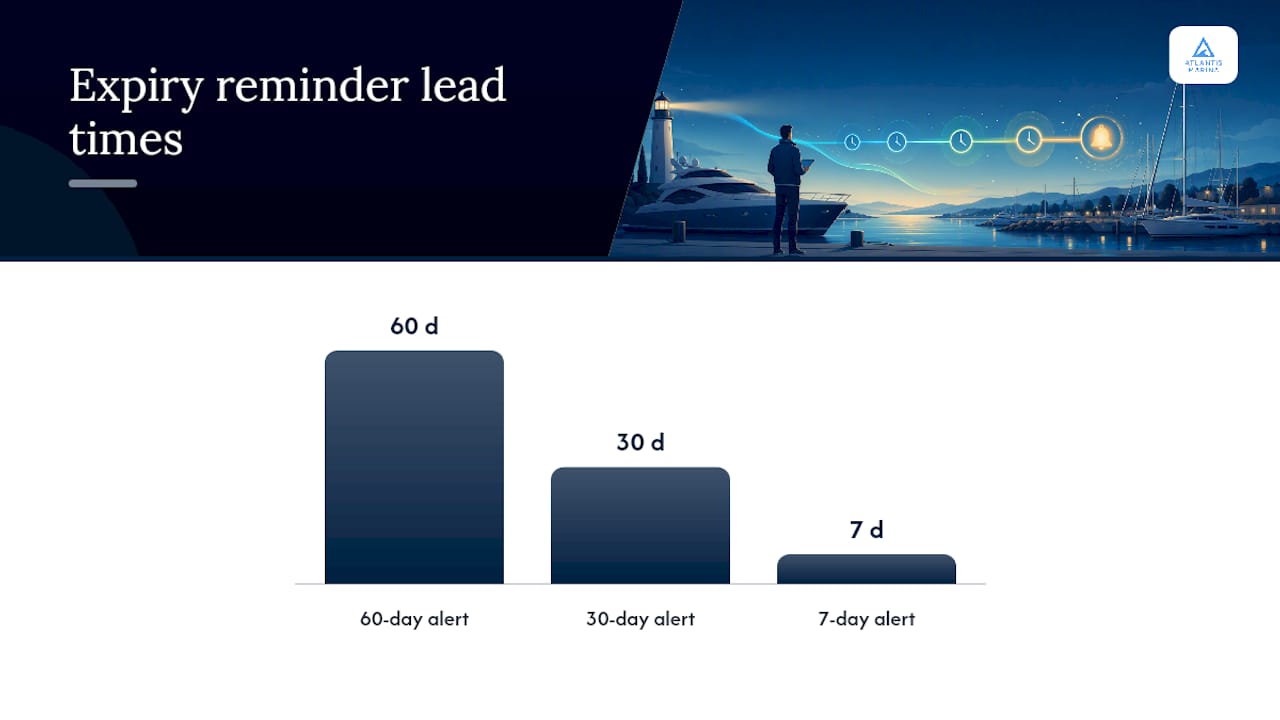
- Set expiry flags. Configure automated alerts at 60, 30, and 7 days before each document expires.
- Hold billing for noncompliance. Link your billing rules so invoices pause when a required document is missing or lapsed.
- Log every action. Capture who uploaded, reviewed, or modified each file, with timestamps, for audit readiness.
Two immediate payoffs: your facility passes inspections without a paper scramble, and billing runs without interruption because coverage gaps are caught before they become disputes.
Key Takeaways
Effective marina insurance document tracking requires configured workflows, not manual effort. Require uploads, automate alerts, enforce via billing holds, and maintain an exportable audit trail to protect your facility and keep revenue flowing.
| Point | Details |
|---|---|
| Require upload at onboarding | Make COI submission a condition of slip assignment before a boater takes occupancy. |
| Automate expiry alerts | Set reminders at 60, 30, and 7 days before expiration to give boaters time to renew. |
| Enforce via billing holds | Link compliance status to billing so lapsed documents automatically pause invoices. |
| Secure with audit logs | Log every access and edit with user ID and timestamp; retain records for at least five years. |
| Use Atlantis Marina | Atlantis Marina maps portal uploads, OCR parsing, expiry alerts, billing holds, and QuickBooks sync to a single configured workflow. |
Table of Contents
- Why Does Formal Document Tracking Matter for Your Marina?
- What Documents and Data Fields Should You Collect?
- How Do You Collect and Verify Documents Efficiently?
- What Automation Features Does Your Marina Software Need?
- How Do You Enforce Compliance Without Frustrating Boaters?
- What Security and Audit-Trail Standards Should You Require?
- What Does a Realistic Rollout Look Like?
- How Do You Measure ROI on Document Tracking?
- How Does Atlantis Marina Handle the Full Document Workflow?
- The Case for Ditching the Clipboard
- Ready to See Atlantis Marina in Action?
- Sources
- FAQ
Why Does Formal Document Tracking Matter for Your Marina?
Treating insurance compliance as a tactical risk-management tool rather than a paperwork checkbox changes how your whole operation handles liability. When a vessel causes a fuel spill or dock collision, the first question your insurer asks is whether the boater carried valid coverage at the time of the incident. A platform-based record answers that question in seconds. A filing cabinet does not.
Consider a common scenario: a boater's COI expired in March, but the dockmaster didn't catch it until a June inspection. The marina had no documented proof of coverage for that three-month window. Digital tracking with automated expiry alerts closes that gap entirely. Faster claims reconciliation, cleaner renewal conversations with your own carrier, and inspection readiness on demand are the direct operational results.
What Documents and Data Fields Should You Collect?
The documents required for a marina insurance application overlap significantly with what you should collect from every boater. Your standard document set should include:
- Certificate of insurance (COI) with liability limits and additional insured wording
- Vessel registration (state-issued, current year)
- Policy endorsements naming the marina as certificate holder
- Signed slip lease or storage contract
- Fuel operation permits (for liveaboards or commercial operators)
For each document, capture these metadata fields in your platform:
Linking each document record to a specific slip ID and vessel HIN lets staff pull a complete compliance picture for any berth in under a minute. That cross-reference also matters when reviewing coverage before renewal to confirm that your boaters' policies actually match the vessels and operations on your docks.
How Do You Collect and Verify Documents Efficiently?
Require boater uploads through a self-service portal or enforce submission at check-in. That single policy eliminates the back-and-forth of chasing paper copies.
Portal upload workflow:
- Boater logs into the Atlantis Boater App or web portal and navigates to the Documents section.
- Boater uploads a PDF or image of the COI and registration.
- The platform's OCR engine parses key fields (carrier, policy number, expiry date, limits) and auto-fills the record.
- Staff receive a review notification and verify the additional insured wording and liability limits.
- Staff approve the document or flag it for correction, triggering an automatic status update to the boater.
In-person QR workflow: A boater arrives at the dock without a prior upload. The dockmaster scans the boater's account QR code, which pulls up the customer record instantly. The system shows a missing-document alert, and the dockmaster sends the boater a direct upload link via SMS. The boater uploads from a phone in under two minutes, and the record updates in real time.
Pro Tip: Restrict acceptable file types to PDF and JPEG, set a minimum resolution requirement, and validate required fields before allowing submission. This prevents illegible uploads from reaching the review queue.
For marinas exploring broader document-management options, resources on document management alternatives can offer useful context on portal design and workflow configuration.
What Automation Features Does Your Marina Software Need?
Require these capabilities before committing to any platform. Manual tracking at scale is where compliance breaks down.
| Automation Feature | Trigger | Timing |
|---|---|---|
| Expiry reminder to boater | Document expiration approaching | 60, 30, and 7 days before expiry |
| Staff escalation alert | Boater has not responded to reminder | automated alerts before expiry |
| Billing hold activation | Document expired or missing | Day of expiry |
| Auto-flag for review | OCR detects limit below threshold | At upload |
| Certificate holder check | Additional insured field does not match marina name | At upload |
Beyond alerts, your platform should sync with QuickBooks Online so billing holds and payment records stay consistent across your accounting workflow. Payment processor integration (Stripe, ACH) keeps autopay running for compliant accounts while holds pause noncompliant ones. QR-code workflows and smart access controls can extend enforcement to physical dock access, so a lapsed certificate affects more than just an invoice.
How Do You Enforce Compliance Without Frustrating Boaters?
A clear, graduated enforcement policy protects the marina and gives boaters a fair path to resolution. The operational flow looks like this:
- Initial reminder (60 days out): Automated email and SMS notify the boater of the upcoming expiration with a direct upload link.
- Second reminder (30 days out): A follow-up message includes the marina's policy language and a deadline.
- Grace period (7 days post-expiry): The account is flagged, billing is paused, and the dockmaster receives a daily escalation report.
- Temporary hold (day 8 post-expiry): Slip access may be restricted; the boater receives a formal notice with a resolution deadline.
- Denial of service: Reserved for persistent noncompliance after documented outreach. Document every step before reaching this stage.
For edge cases, keep two policies ready. When a boater's renewal is in transit, accept a binder letter with a confirmed expiry date and set a 10-day follow-up task. When a third-party vendor (fuel supplier, charter operator) requests a certificate from your marina, route that request through your document portal so the exchange is logged and versioned.
What Security and Audit-Trail Standards Should You Require?
Store all documents encrypted at rest, log every access and edit event tied to a user ID and timestamp, and retain versioned copies so no file can be silently overwritten.
Retention periods should align with your state's statute of limitations for maritime claims (typically three to six years) and your municipality's inspection cycle. At minimum, retain documents for five years after a slip agreement ends. Your audit log should capture: who uploaded, who reviewed, what changed, and when. Exportable logs in CSV or PDF format let you hand auditors a complete record without granting them system access. For deeper guidance on organizing these records, the marina document management guide covers staff roles and retention workflows in detail.
What Does a Realistic Rollout Look Like?
A multi-week pilot-driven rollout is achievable for most marinas. Move through these stages:
- Week 1: Define document requirements, expiry thresholds, and billing-hold rules with your operations team.
- Week 2: Configure the platform: upload templates, set alert schedules, map slip IDs to vessel records.
- Week 3: Import existing boater records and any current COIs on file.
- Week 4: Run a pilot on 10–20 slips. Test the full workflow: upload, OCR parse, staff review, expiry alert, billing hold.
- Weeks 5–6: Train all dockmaster and office staff on the review queue, escalation steps, and QR workflows.
- Week 7: Full facility launch. Notify all boaters of the new upload requirement with a 30-day grace period.
- Week 8: Post-launch review. Measure compliance rate, flag unresolved gaps, and adjust alert timing if needed.
Assign a single staff owner for the document queue during the pilot. That person becomes your internal trainer for the full rollout.
How Do You Measure ROI on Document Tracking?
Track compliance rate, days-to-verify, claims response time, and revenue recovered through billing holds. These four KPIs tell you whether the system is working.
A simple ROI calculation: multiply staff hours saved per month by the average hourly cost, add the estimated cost of one prevented uninsured-vessel claim, then divide by your monthly platform cost. Even a modest time saving of two hours per week across two staff members at $25/hour yields $200/month in recovered labor, before accounting for claim risk reduction.
Weekly dashboard metrics to monitor:
- Compliance rate (percentage of active slips with current, verified documents)
- Open review queue (documents awaiting staff approval)
- Expiring within 30 days (boaters needing outreach)
- Billing holds active (accounts paused for noncompliance)
- Average days-to-verify (upload to approval)
Reviewing these metrics monthly also prepares you for renewal season. Aligning your coverage to actual operations before your own policy renews is far easier when you have a clean compliance report to hand your agent.
How Does Atlantis Marina Handle the Full Document Workflow?
Atlantis Marina covers every step in the checklist: portal uploads via the Boater App, QR-code check-in workflows, OCR extraction, expiry alerts, billing holds, QuickBooks Online sync, and exportable audit logs.
Here is how the platform maps to each requirement:
- Document collection: Boaters upload COIs and registrations through the Atlantis Boater App or web portal. QR-code workflows let dockmasters trigger upload requests from the dock in real time.
- Parsing and verification: OCR extracts policy number, carrier, limits, and expiry date at upload. Staff review flagged fields in the operations dashboard.
- Expiry monitoring: Configurable alert schedules notify boaters and staff at defined intervals. Lapsed documents automatically trigger billing holds via marina billing automation.
- Accounting sync: QuickBooks Online sync keeps billing holds and payment records consistent without manual entry.
- Audit trail: Every upload, review, approval, and edit is logged with user ID and timestamp and is exportable for inspections.
Pro Tip: Use Atlantis Marina's vessel records module to link each COI directly to a hull identification number and slip assignment. When a boater moves slips or swaps vessels, the document requirement follows the record automatically.
For vessel registration tracking alongside insurance documents, the vessel registration tracking guide explains how to keep both record types synchronized.

The Case for Ditching the Clipboard
The first time a marina runs a digital compliance report and hands it to a state inspector in under 60 seconds, the argument for paper is over. What most operators underestimate is not the technology — it is how much staff time was quietly disappearing into document chasing before the switch. Two hours a week per dockmaster adds up to more than 100 hours a year, and that is before counting the billing disputes that stem from unverified coverage. The real resistance to digital tracking usually comes from staff who learned the job on paper and worry the system will make their role redundant. It does not. It redirects their attention from filing to judgment: reviewing flagged documents, handling edge cases, and managing the boater relationship when enforcement is necessary. That is a better use of a dockmaster's expertise than hunting for a fax.
Ready to See Atlantis Marina in Action?
Marinas that have moved from spreadsheets and email chains to a configured document workflow report faster inspections, cleaner billing cycles, and fewer coverage disputes. Atlantis Marina delivers that workflow out of the box, with no custom development required.
Book a demo at Atlantis-marina and see the full document workflow configured for your facility. A demo session covers:
- Document upload and OCR parsing walkthrough
- Expiry alert and billing-hold configuration
- QR-code check-in setup for in-person workflows
- QuickBooks Online sync demonstration
Schedule your demo today and get your marina's compliance workflow running within weeks.
Sources
Atlantis Marina product pages:
- Risk Management for Marinas: What to Address in Your Plan – Mariners General Insurance Group
- MARINA OPERATIONS and SERVICES BUSINESS INSURANCE_APPLICATION QUESTIONS - Kelly Insurance Group
- Marina insurance coverage gaps | Marshall+Sterling
External references:
FAQ
What is marina insurance document tracking in a management platform?
It is the process of collecting boater-uploaded COIs and registrations, storing them in a cloud platform, monitoring expiration dates, and enforcing compliance through automated alerts and billing holds.
Which documents should a marina require from every boater?
At minimum: a current certificate of insurance with liability limits and additional insured wording, a valid state vessel registration, and a signed slip lease or storage contract.
How does automated expiry monitoring reduce liability?
Automated alerts notify boaters and staff before coverage lapses, so the marina never unknowingly hosts an uninsured vessel. Billing holds add a financial incentive for boaters to renew on time.
How does Atlantis Marina handle document compliance?
Atlantis Marina supports boater portal uploads, QR-code check-in workflows, OCR parsing, configurable expiry alerts, billing holds, QuickBooks sync, and exportable audit logs — covering the full compliance workflow in one platform.
How long should a marina retain insurance documents?
Retain documents for at least five years after a slip agreement ends, aligned with typical maritime claim statutes of limitations and your municipality's inspection requirements.