

Yes, marinas can use e-signatures for most slip, rental, and service contracts, and they hold up legally when the workflow meets ESIGN and UETA standards. E-signature for marinas speeds up contract turnaround, cuts paperwork, and connects signed agreements directly to billing so marinas get paid faster. Getting there means choosing a compliant signing flow, building templates for slip and rental agreements, and linking signatures to payments and accounting.
TL;DR:
- The speed and efficiency of e-signatures allow slip rental agreements to be signed within minutes, reducing dockside delays during peak season.
- Linking signatures to payments and accounting enables immediate invoicing and faster revenue collection, improving cash flow and reducing manual work.
- Using specific templates for high-volume contracts like renewals and waivers minimizes errors and supports automated renewals and compliance documentation.
- Electronic signatures are legally enforceable in the US when they demonstrate intent, consent, a clear link to the record, and an audit trail, but some documents like real estate or notarized forms may still require wet signatures.
- Integrating e-signature tools with marina management systems, automating multi-party workflows, and training staff properly ensures a smooth transition and sustained operational benefits.
Table of Contents
- What Are the Benefits of E-Signatures for Marina Operations?
- What Marina Contracts Work Best With E-Signatures?
- Are E-Signed Marina Contracts Legally Enforceable?
- How Do You Roll Out E-Signatures at a Marina?
- Which Integrations Matter Most for Marina E-Signatures?
- How Should Marinas Design the Signer Experience?
- Do Environmental and Boating Regulations Affect E-Signature Use?
- How Should Marinas Protect Personal Data in E-Signature Workflows?
- How Do You Train Staff and Customers on New Signing Tools?
- Does E-Signature Software Work With Other Marina Systems?
- How Do You Handle Multi-Party Signatures on Marina Contracts?
- What Happens If Signed Documents Are Lost or a System Fails?
- How Does Atlantis Marina Handle E-Signatures for Marinas?
- A Marina Manager's View: What Changed After Going Digital
- Sources
- FAQ
What Are the Benefits of E-Signatures for Marina Operations?
The biggest win is speed. A slip rental agreement that used to sit in an inbox for multiple days can now get signed in minutes when a boater opens a link on their phone at the dock. Digital contract systems built around template creation and real-time status tracking cut turnaround from days to minutes, which matters most during peak season when every day a contract sits unsigned is a day of lost dockage revenue.
Beyond speed, marinas see:
- Fewer printed pages, less scanning, and less time staff spend chasing signatures by phone or email
- Faster collections when signing triggers an immediate invoice or autopay setup rather than a follow-up call
- A complete, searchable record of every contract instead of a filing cabinet of loose paper
- Fewer disputes, since every signed document carries a timestamp and identity record tied to it
Statistic Callout: Contract management data shows that moving from email-chain negotiations to same-day digital execution directly improves cash flow and project start times — a pattern that translates directly to slip rentals and service work at a marina.
What Marina Contracts Work Best With E-Signatures?
Not every document needs the same signing flow, and matching the right workflow to each use case is where most of the operational payoff shows up.
- Seasonal and annual slip rentals. These are the highest-volume, highest-value contracts a marina generates. Template-driven creation with dynamic fields for vessel length, slip number, and rate lets renewals go out automatically each year without a staff member rebuilding the document from scratch, an approach that prevents manual errors during renewal cycles.
- Transient dockage waivers. A boater pulling in for one night should not need to create an account to sign a liability waiver. No-account, no-login signing links handle this well.
- Service and haul-out authorizations. Maintenance work, parts orders, and haul-out approvals move faster when a mechanic can send a one-page authorization from a tablet and get it signed before work starts.
- Insurance and registration verification. Linking a signed slip contract to an uploaded insurance certificate and registration document closes a compliance gap many marinas still handle on paper.
Are E-Signed Marina Contracts Legally Enforceable?
Yes. In the US, the federal ESIGN Act and the state-level Uniform Electronic Transactions Act (UETA) give electronic signatures the same legal weight as ink signatures for most commercial contracts, including slip rentals and service agreements. DocuSign notes that e-signatures are legally enforceable across many contract types when the signing process demonstrates clear intent and consent.
Legal defensibility rests on four things:
- Intent to sign, shown through an affirmative action like clicking "sign" or drawing a signature
- Consent to do business electronically, usually captured in a disclosure the signer agrees to before signing
- A clear link between the signature and the record, so the document can't be altered after signing without detection
- An audit trail recording the timestamp, IP address, signer identity method, and any tamper-evident seal
Signeasy's platform, for example, generates a full audit trail and tamper-evident certificate for every completed document. A handful of situations still call for extra caution: real estate transfers, certain notarized documents, and some government filings may still require wet signatures or added verification, so check state-specific rules before assuming every marina form qualifies.
How Do You Roll Out E-Signatures at a Marina?
A phased rollout beats a flip-the-switch approach every time. Here's the sequence that tends to work:
- Inventory every document you use. List slip contracts, transient waivers, service authorizations, insurance forms, and any internal approvals. You can't automate what you haven't mapped.
- Pick a signing flow for each audience. Seasonal tenants might sign through an app account, while transient boaters need a no-login email or SMS link, and walk-up customers may sign on a dockside tablet.
- Build templates with dynamic fields. Vessel information, slip number, seasonal rate, and renewal date should populate automatically instead of being retyped for every contract.
- Connect payments and accounting. Tie signature completion to autopay setup, Stripe or ACH processing, and a QuickBooks sync so revenue gets billed and booked without manual entry.
- Pilot with a small group. Run it with two or three staff members and a handful of boaters for one billing cycle before opening it to everyone.
- Train staff and publish signer instructions. A one-page guide at the dock office and a short walkthrough video for boaters prevents most support calls.
- Set a retention and archiving policy. Decide how long signed contracts stay accessible and how they're backed up.
Pro Tip: Run your pilot during a slower month, not peak season. You want to catch template mistakes and signer confusion when a missed signature doesn't mean a boat sitting at the fuel dock waiting on paperwork.
Which Integrations Matter Most for Marina E-Signatures?
Signing a contract is only half the job. What happens immediately after the signature is where most marinas either gain efficiency or lose it right back to manual follow-up.
- Payment processors and autopay. Linking signature completion to an immediate payment step, rather than a signature-first, invoice-later process, meaningfully cuts collections lag compared to sending an invoice days later.
- Accounting sync. A QuickBooks connection means signed contracts translate into booked revenue without a bookkeeper re-entering line items.
- Embedded signing in reservation flows. Signing built directly into a boater's reservation or account portal removes an extra app or email step.
- APIs and webhooks. Vendors increasingly embed signing directly into apps and workflows using APIs and webhooks, which lets a marina's own reservation system trigger a contract the moment a slip is booked, rather than as a separate manual step.
How Should Marinas Design the Signer Experience?
Most boaters will sign on a phone, often standing on the dock with one hand on a line. Design for that reality first, not for a desktop screen.
- Keep forms short. Ask only for what the contract needs, and use large, thumb-friendly fields.
- Offer no-account signing for transient customers, paired with a light identity check like a phone number or photo ID upload rather than forcing account creation, since signing is often free for the recipient on most platforms.
- Set a clear signing order for multi-party agreements, such as boat owner first and marina manager second, so approvals happen in the right sequence.
- Write waivers in plain language and require an explicit consent checkbox rather than assuming a scroll-to-bottom action counts as agreement.
Pro Tip: A short waiver with no-account signing plus an optional photo ID upload gives transient boaters a fast experience while still giving the marina a traceable identity record if a dispute ever comes up.
Do Environmental and Boating Regulations Affect E-Signature Use?
E-signature technology itself doesn't change a marina's environmental or safety obligations. What it changes is how reliably those obligations get documented. Many marinas operate under state clean marina programs, Coast Guard pump-out requirements, or local harbor authority rules that require signed acknowledgments: fuel dock safety briefings, pump-out usage agreements, hazardous waste disposal acknowledgments, and hurricane or storm evacuation plans tenants must sign off on each season.
Electronic signing makes these acknowledgments easier to enforce consistently, since a marina can require a signed environmental compliance form as a condition of slip activation rather than hoping a paper form gets filed correctly. A slip contract template can include a mandatory sub-section for environmental acknowledgments, so a boater can't complete the primary rental agreement without also confirming they've reviewed fueling procedures, sewage discharge rules, or invasive species inspection requirements where applicable.
This matters most for marinas operating in states with strict discharge or ballast water rules, or those near protected waterways where regulatory audits are more frequent. Having a timestamped, signed acknowledgment on file, rather than a verbal briefing nobody documented, gives a marina real protection if a regulator or insurer asks for proof that tenants were informed of their obligations. The same logic applies to boating safety regulations tied to specific slip types, like fire suppression requirements for larger vessels or fueling restrictions in certain berths. Building these into the signing workflow, rather than treating them as a separate paper process, keeps compliance documentation as current as the rest of the contract file.
How Should Marinas Protect Personal Data in E-Signature Workflows?
Marina contracts collect a fair amount of sensitive information: names, addresses, payment details, insurance policy numbers, and sometimes driver's license or passport images for identity verification. That data needs handling with the same care a bank would apply to account records, not the casual treatment a paper folder in a drawer might get.
A few practices matter more than others. Limit access to signed documents and uploaded identity records to staff who actually need them, rather than giving every dockhand account-wide visibility. Store documents with encryption both in transit and at rest, since DocuSign points to strong encryption as a baseline standard for any credible e-signature platform. Set a clear data retention schedule so old identity documents and expired contracts don't sit indefinitely in a system with no review process.
Marinas that collect insurance and registration documents alongside signatures should also think about who else might request that data, such as an insurer verifying coverage or a harbor authority conducting an audit, and have a documented process for releasing records only through an authorized request. A manager's guide to tracking insurance documents is a useful reference point for building that process instead of improvising it contract by contract.
Finally, be transparent with boaters about what's collected and why. A short line in the signing disclosure explaining that identity verification is used solely to confirm signer authenticity, not shared with third parties beyond required insurance or regulatory reporting, builds trust and reduces the "why do you need my ID" pushback front desk staff often field.
How Do You Train Staff and Customers on New Signing Tools?
Adoption fails more often from unclear instructions than from bad software. Staff need to know not just how to send a contract, but what to do when a boater calls confused about a signing link, or when a signature fails to register because of a spotty dock Wi-Fi connection.
Start staff training with the two or three workflows they'll use daily, like sending a seasonal renewal or a transient waiver, rather than a full walkthrough of every feature the platform offers. A short reference card taped near the front desk computer, listing steps for the most common signing scenario, solves more problems than a lengthy manual nobody rereads.
For customers, the goal is removing confusion before it happens. A one-paragraph email explaining what to expect, how long signing takes, and what device works best prevents most support calls. Some marinas post a simple QR code at the dock office that links directly to signing instructions, so a boater who's never used e-signatures before isn't guessing.
Ongoing support matters as much as the initial rollout. Designate one staff member as the point person for signing issues during the first season, someone who can troubleshoot a stuck document or resend a link without escalating to IT. As templates mature and staff get comfortable, that support burden drops sharply, but skipping this step in year one is where most rollouts stumble.
Does E-Signature Software Work With Other Marina Systems?
A signing tool that only signs documents and does nothing else creates a second silo alongside the reservation system, the billing system, and whatever spreadsheet tracks vessel maintenance. The real value comes from a signing workflow that talks to the rest of a marina's operations.
That means checking compatibility beyond billing: does the e-signature tool connect to slip assignment and reservation records, so a signed contract automatically updates a boater's status from "pending" to "active"? Does it sync with vessel and customer records, so a renewed contract updates insurance expiration dates without a separate manual entry? Does it work across the tools staff already use daily, whether that's a dockside tablet, a front-office desktop, or a phone at the fuel dock?
Marinas running fragmented systems, one tool for reservations, another for billing, a third for signatures, end up with the same document trapped in three different silos. An marina management platform built around a shared marketplace of connected services avoids that fragmentation by keeping documents, billing, and operational records in one system rather than stitching together point solutions after the fact.

How Do You Handle Multi-Party Signatures on Marina Contracts?
Marina agreements rarely involve just one signer. A slip rental might need the boat owner's signature and a co-owner's, plus a marina manager's countersignature to activate the contract. A service authorization might need sign-off from both the vessel owner and a designated captain or property manager handling the boat on the owner's behalf.
Handling this well starts with a defined signing order. If a contract requires the marina manager's approval after the boater signs, the workflow should route it that way automatically rather than relying on someone remembering to forward it. Third-party authorizations, like a property manager signing on behalf of an absentee boat owner, need a documented delegation of authority attached to the contract record, not just an assumption that whoever signed had the right to.
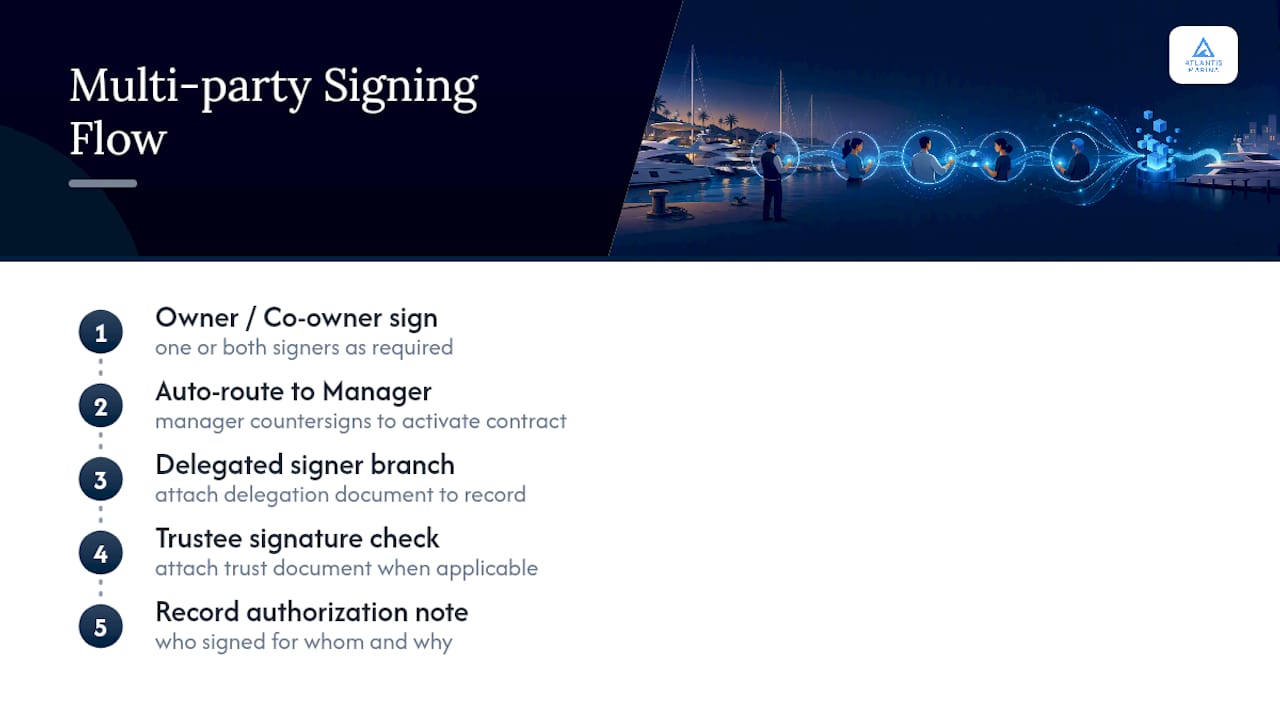
For co-owned vessels, some marinas require both owners' signatures on the initial slip contract but allow either party to sign routine service authorizations independently. Setting that rule clearly in the template, rather than deciding case by case, prevents disputes later about who was authorized to approve what. Trust and estate ownership structures add another layer, since a signature from a trustee may need to reference the trust document itself to hold up if ever challenged. Building a simple authorization note field into multi-party templates, where staff can record who signed on whose behalf and why, closes most of this gap without adding real friction to the signing process.
What Happens If Signed Documents Are Lost or a System Fails?
A signed contract that only exists in one place isn't really secure, no matter how tamper-evident the signature itself is. Marinas need a backup and recovery plan that treats signed documents with the same seriousness as financial records, because in a dispute or audit, that's exactly what they function as.
The baseline expectation should be automatic, redundant storage: documents saved in a cloud system with geographic redundancy, not a single server or local hard drive that could fail during a storm surge or power outage. Digital contract systems that handle automatic distribution and secure archiving of executed documents as part of the signing workflow remove the need for a manual backup step that staff might forget.
Beyond storage, marinas should know how quickly they can retrieve a specific document if needed. If a boater disputes a renewal date six months after signing, staff should be able to pull that exact document, with its audit trail intact, within minutes, not by searching through a shared drive folder. Testing that retrieval process once a year, treating it like a fire drill for paperwork, catches gaps before they matter in an actual dispute.
Finally, consider what happens if the signing platform itself changes or a marina switches vendors. Contracts signed years ago should remain accessible and verifiable even after a system migration, which means choosing a platform with clear data export and long-term archive access built in, rather than one that locks historical documents behind an account that might someday be closed.
How Does Atlantis Marina Handle E-Signatures for Marinas?
Atlantis Marina is built around the exact workflow this article walks through: sign, bill, and reconcile, all in one connected system instead of three disconnected tools.
Atlantis E-Sign gives marinas template-driven contracts for slip rentals, transient waivers, and service authorizations, with in-app and web signing, a full audit trail, and tamper-evident records baked into every completed document. Because it's built into the same platform that handles billing, a signed contract can trigger autopay setup, Instant Pay collection, and Stripe or ACH processing immediately, with QuickBooks Online sync keeping the books current without manual re-entry. Boaters sign through the Atlantis Boater App or web portal, where they can also reserve slips, upload insurance and registration documents, and track everything from one account that travels with them across the Atlantis Marina Network. For day-to-day questions, from renewal timing to payment status, Atlantis Bot handles routine boater interactions so staff spend less time on repetitive requests and more on the ones that actually need a human. Marinas piloting the platform typically start with one property or one contract type, using Atlantis Marina's sales team to map a rollout plan before scaling across additional locations. If you're ready to see how a signed contract can move straight into a paid, booked, and reconciled record, request a walkthrough and bring your current slip contract template to the call.
A Marina Manager's View: What Changed After Going Digital
The clearest sign e-signatures were working wasn't a metric. It was the quiet at the front desk during renewal season, when staff weren't chasing down signatures by phone anymore. Paperwork hours dropped noticeably, and payments that used to trail a signed contract by a week started arriving the same day, because signing and paying became one motion instead of two.
The lesson worth passing on: pilot small and measure two things specifically, time-to-sign and payment lag, before rolling out marina-wide. And keep templates lean. The instinct is to add every possible field and disclosure. Boaters sign faster, and complain less, when a contract asks for exactly what it needs and nothing more.
— John R
Sources
- Electronic Signature Software — Send, Sign, and Track | Signeasy
- e-Sign a contract | Docusign
- Digital Contracts System
FAQ
What Are the Legally Acceptable Digital Signatures?
A legally acceptable digital signature must show clear intent to sign, consent to do business electronically, and a verifiable link between the signature and the document, backed by an audit trail. Under ESIGN and UETA, this covers typed names, drawn signatures, and click-to-sign actions, provided the platform records identity and timestamp data.
What Documents Cannot Be Electronically Signed?
Most marina contracts, including slip rentals, waivers, and service authorizations, qualify for electronic signing. Certain real estate transfers, some notarized documents, and specific government filings may still require wet signatures or added verification, so check state rules for edge cases.
How Do I Get an E-Signature Set Up for My Marina?
Start by inventorying your contracts and waivers, then choose a signing flow, in-app, no-account email link, or dockside tablet, that matches how each type of customer interacts with your marina. Platforms like Atlantis E-Sign combine template creation with billing integration so signed contracts convert directly into invoiced revenue.
Are Electronically Signed Contracts Legal?
Yes, electronically signed contracts are legally enforceable in the US under the federal ESIGN Act and state UETA laws, covering most commercial agreements including marina slip and service contracts. DocuSign notes this enforceability holds across many contract types as long as the signing process documents clear consent and intent.