

Marina billing automation replaces manual invoicing, chasing payments, and reconciling spreadsheets with a system that generates invoices, collects payments, sends reminders, processes refunds, and syncs every dollar to your accounting ledger, across berth, service, and utility charges alike. The result is faster collections, fewer hours spent on manual entry, and books that stay current without a bookkeeper re-typing anything. A unified marina operations platform like Atlantis Marina is the most direct path to those outcomes because billing, reservations, and accounting sync live in one system instead of three.
TL;DR:
- Automated reminders and payment retries are the most effective features for improving collections, especially if invoices are still manually sent.
- The system must support various billing periods and complex charge types, including utilities, ship store purchases, and vehicle parking, with accurate rate mapping.
- Direct integration with QuickBooks Online or Xero ensures data flows seamlessly into accounting, reducing manual reconciliation and errors.
- Piloting automation with a small group allows testing proration, refunds, and dispute workflows before a full marina rollout.
- Most marinas see a quick return on investment within three to six months, mainly from reduced staff hours and higher autopay enrollment.
Table of Contents
- What Features Should Marina Billing Automation Include?
- How Does Automation Handle Everyday Marina Billing Workflows?
- Which Charge Types Does Marina Billing Software Need to Support?
- How Does Billing Automation Sync With Accounting Systems?
- How Do You Roll Out Billing Automation at Your Marina?
- What ROI Should You Expect From Marina Billing Automation?
- How Does Atlantis Marina Handle Marina Billing Automation?
- Realistic Expectations for Rolling Out Billing Automation
- Get Started With Atlantis Marina's Billing Automation
- Sources
- FAQ
What Features Should Marina Billing Automation Include?
The right system needs to handle both the routine and the messy exceptions, since marina revenue rarely fits one clean billing rhythm.
Recurring invoicing should support monthly, quarterly, and seasonal billing periods, because a transient dock and a year-round tenant don't run on the same clock. Autopay needs card-on-file and ACH options, with automatic retry logic and clean refund or chargeback handling when a payment fails or a tenant disputes a charge.
Look for these core capabilities when evaluating a platform:
- Flexible recurring invoicing across monthly, seasonal, and custom billing periods
- Autopay with card-on-file, ACH, and automatic retry on failed payments
- Automated reminders, configurable late fees, and dunning sequences before an account goes delinquent
- A branded customer portal where tenants view invoices, update payment methods, and pay online
- Meter-driven billing that applies usage-based rates automatically
- Point-of-sale capture for ship store purchases and service charges that route straight to the tenant's account
Automated reminders and payment retries account for most of the collections improvement operators see, according to SMB automation coverage. That's the feature worth prioritizing first if your marina is still sending invoices by hand.
How Does Automation Handle Everyday Marina Billing Workflows?
A marina's billing calendar isn't one workflow. It's several running at once, and automation needs to touch each stage without staff intervention.
- Reservation to invoice. A transient booking or slip request generates an invoice automatically at check-in, with taxes and fees calculated from the reservation record, then reconciled against the payment collected at checkout.
- Seasonal tenant billing. Recurring invoices fire on schedule for annual and seasonal slip holders, with grace-period rules that determine when a late fee applies versus when a payment is still within policy.
- Repair, haul-out, and ship-store charges. Work orders and point-of-sale purchases post directly to the tenant's account instead of landing on a separate paper ticket that someone has to key in later.
- Accounts receivable follow-up. Aging reports flag overdue balances, and automated collections touchpoints (email, SMS, portal notices) go out before an account becomes a write-off.
Each stage feeds the same ledger, so a transient guest, a seasonal tenant, and a haul-out customer all show up in one AR view instead of three disconnected logs.
Which Charge Types Does Marina Billing Software Need to Support?
A marina's revenue mix is wider than most billing software is built for, which is exactly where generic invoicing tools fall short. The system needs to bill correctly for every physical asset and service a marina sells, not just monthly rent.
- Berth and moorage fees, calculated by length overall (LOA), berth type, and time unit, whether that's a night, a month, or a season
- Metered utilities, including shore power billed by kilowatt-hour and water usage, applied automatically as consumption data comes in
- Point-of-sale and ship-store purchases routed to the tenant's running balance
- Fuel, dry-stack storage, and launch or crane service fees, each with its own rate table
- Parking and deposit handling, with automated refund logic when a deposit is returned
Metered billing for shore power and water is the trickiest category, because it depends on reliable measurement feeds and correct rate mapping rather than a flat monthly charge. Get metered utility billing wrong and every kilowatt-hour dispute becomes a manual investigation, which defeats the purpose of automating in the first place.
How Does Billing Automation Sync With Accounting Systems?
Billing automation only pays off if the numbers land in your books without someone re-entering them. That means a direct sync to QuickBooks Online or Xero, with invoices, payments, and refunds mapping to the correct accounts and customer records automatically.
- QuickBooks Online and Xero integrations should push invoice and payment data on a schedule, not require a manual export
- Payment processors like Stripe and ACH rails need PCI-compliant handling so card data never sits unencrypted in your system
- Data from POS terminals, utility meters, and the reservation system should all flow into the same accounts receivable ledger
- Month-end close needs an AR aging report, a payments-received report, and a reconciliation summary that matches your bank deposits
Direct accounting syncs and template-based invoicing are what most reduce reconciliation friction for small finance teams, according to invoice-processing automation research. If your current setup still needs a spreadsheet to bridge billing and QuickBooks, that gap is the first thing to close.
How Do You Roll Out Billing Automation at Your Marina?
Rolling out automation works best as a sequence, not a single flip of a switch.
- Audit every charge type you currently bill and map each one to a field in the new system, including one-off fees that don't fit a standard template.
- Set up merchant and ACH accounts, define payment policies, and enable e-signature contracts so new and renewing tenants sign electronically instead of on paper.
- Pilot autopay with a small tenant cohort first. Test prorations, mid-season cancellations, and refund scenarios before turning it on marina-wide.
- Train staff on the new workflows, document escalation rules for disputes, and schedule the full rollout in phases rather than all at once.
Piloting on a small group before a full rollout is standard practice for a reason: proration and refund edge cases are where automated billing breaks if they weren't tested first.
Pro Tip: Run your pilot cohort through a full billing cycle, including at least one refund and one late payment, before you expand to the rest of your tenants. Edge cases surface in week three, not week one.
What ROI Should You Expect From Marina Billing Automation?
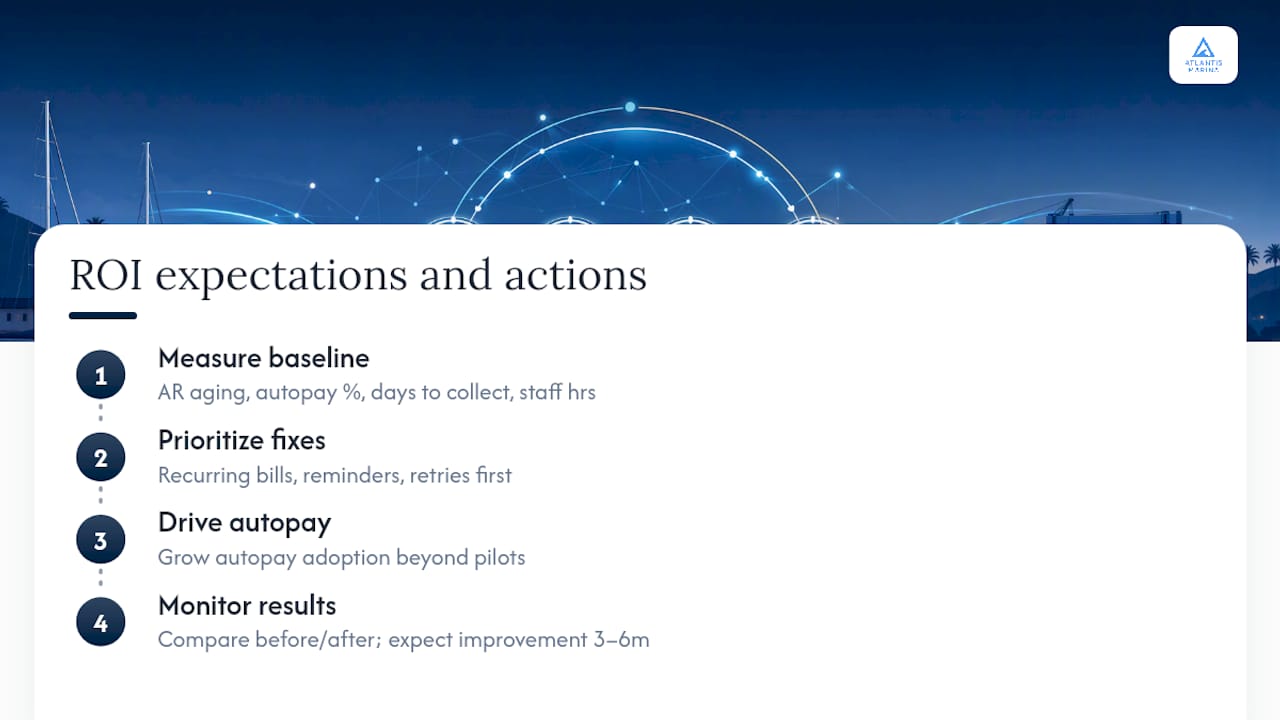
The financial case for automation shows up fastest in three places: fewer staff hours spent chasing payments, a higher share of tenants on autopay, and a shorter average collection cycle.
Track accounts receivable aging, the percentage of tenants enrolled in autopay, average days to collect, and staff hours spent per billing cycle before and after rollout. Those four numbers tell you whether the system is working.
What the automation actually saves: Recurring billing, automated reminders, and payment retries account for most of the operational gains marinas see from automation, per SMB automation research, which means the fastest ROI comes from fixing recurring invoicing and reminders before tackling anything more complex like metered utilities.
Most marinas see measurable improvement in on-time payment rates within the first three to six months, once autopay adoption climbs past the early pilot group and staff stop manually chasing every overdue invoice.
How Does Atlantis Marina Handle Marina Billing Automation?
Atlantis Marina builds billing automation into the same system that handles reservations, slip assignments, and tenant records, so nothing needs a separate export or a second login.
Contracts get signed through Atlantis E-Sign, autopay and Instant Pay handle collections, and Stripe and ACH processing cover the payment side, with refunds and adjustments handled in the same workflow. The marina billing software syncs directly to QuickBooks Online, so revenue is billed, collected, and booked without manual re-entry.
- Recurring invoicing, autopay, and dunning rules built into the core platform
- QR-code account access so staff pull up billing status without a manual search
- An operations dashboard covering AR, documents, and occupancy in one view
- A boater app and portal where tenants pay, review reservations, and manage documents themselves
| What operators need | How Atlantis Marina delivers it |
|---|---|
| Recurring and metered billing | Autopay, e-signed contracts, meter-driven charges |
| Accounting sync | Native QuickBooks Online integration |
| Reduced staff workload | Centralized dashboard, boater self-service portal |
| Fast tenant onboarding | QR-based account access, digital documents |
Realistic Expectations for Rolling Out Billing Automation
Start automation only after your pricing rules are settled. Automating a messy rate structure just automates the mess faster, and that's the single biggest mistake marinas make.
The most common pitfalls aren't technical. They're procedural: incomplete pricing rules that leave gaps for edge cases, staff who weren't trained on the exception workflows, and dispute processes that were never written down before autopay went live. Prioritize recurring billing and reconciliation first. Metered utility integrations can wait until the basics are running cleanly, because that's where most rollout friction actually starts.
— John R
Get Started With Atlantis Marina's Billing Automation
This platform offers an alternative to running billing through a mix of spreadsheets, separate payment processors, and manual QuickBooks entry. It integrates autopay and accounting sync in one system, helping reduce duplicate data entry.
Plans scale from the Micro tier at $150 per month up through Small, Medium, and Large, with Enterprise pricing available on request for larger marina groups. A one-time setup fee covers onboarding, and a platform fee applies to digital payments processed through the system. If you're ready to see how billing automation fits your marina specifically, request a demo through the sales team or review the full pricing breakdown to find the tier that matches your slip count.
Sources
- Invoice Processing Automation · Loturn
- 6 Repetitive Tasks SMBs Can Automate with AI Today · BotiqueAI
FAQ
What Is Marina Billing Automation?
Marina billing automation is software that generates invoices, collects payments, sends reminders, and syncs transactions to accounting systems without manual entry. It covers berth fees, metered utilities, service charges, and point-of-sale purchases in one connected workflow.
How Much Does Atlantis Marina Cost?
Atlantis Marina's plans start at $150 per month for the Micro tier, scaling to Small, Medium, and Large tiers, with Enterprise pricing available on request. A setup fee ranging from $100 to $1000 and a 3% platform fee on digital payments also apply.
Can Billing Automation Handle Metered Utilities Like Shore Power?
Yes, but it requires a metering data feed and correct rate mapping to work reliably. Automating meter-driven billing needs hardware integration or connected sensors to apply charges accurately as usage happens.
Does Marina Billing Software Integrate With QuickBooks?
Most modern marina billing platforms, including Atlantis Marina, sync directly with QuickBooks Online so invoices and payments post automatically. This integration is one of the most common requirements for avoiding double entry between billing and accounting systems.
How Long Does It Take to Roll Out Billing Automation?
A phased rollout, starting with a small tenant pilot before full deployment, typically takes a few weeks to a few months depending on marina size. Most operators see measurable improvement in on-time payments within three to six months of full adoption.