
Yes, switching marina software is practical, and for most operators running manual processes or an aging system, it pays for itself within a season. The right platform cuts front-desk hours, automates billing and collections, and captures bookings you're currently losing to phone tag. Before you sign anything, run a short feature audit against your daily operations: reservations, billing, POS, and the integrations you actually use.
TL;DR:
- Ensuring real-time slip maps and booking engines are in place prevents double-bookings and provides accurate availability information.
- Migrating historical invoice data and vessel IDs carefully avoids duplicate records and revenue miscalculations during account reconciliation.
- Implementing a phased rollout with staff training first and boaters last minimizes workflow disruption and enhances user adoption.
- Allocating time for sandbox testing and data validation reduces errors and failures caused by misaligned fields and integration issues.
- Budgeting for subscription, setup, hardware, and payment processing costs ensures clear understanding of total expenses before committing to a new system.
Table of Contents
- How Do You Know It's Time to Switch Marina Software?
- What Are the Steps to Migrate Marina Software?
- Where Do Marina Data Migrations Usually Go Wrong?
- What Does It Cost to Switch Marina Software?
- How Do You Train Staff and Boaters on New Marina Software?
- What KPIs Show a Marina Software Switch Worked?
- What Should You Actually Expect After Switching?
- How Atlantis Marina Matches the Migration Checklist
- Sources
- FAQ
How Do You Know It's Time to Switch Marina Software?
The signal is almost always operational, not emotional. If your staff re-enters the same tenant data into three separate systems, or your billing depends on one person remembering who owes what, the software is costing you more than the subscription fee. The right replacement should close that gap on day one, not eventually.
Here's the checklist that separates a real upgrade from a lateral move to a different set of headaches:
- Live slip maps and a booking engine that shows real-time availability for both transient and seasonal berths, not a spreadsheet someone updates twice a day.
- Billing that handles both seasonal and transient rate structures, including proration, deposits, and automated invoicing.
- Ship-store POS integrated with the same customer account used for slip billing, so a fuel dock sale and a monthly rent charge land in one ledger.
- Waitlists and dry-stack workflows, including launch queue management if you run a lift operation.
- Payments and accounting: autopay, ACH and card processing (Stripe is the industry standard most platforms build on), refunds and chargeback handling, and a direct QuickBooks Online sync so your bookkeeper isn't reconciling by hand.
- Hardware and integrations: smart lift control, camera and sensor systems, access control, and an open API for anything you already run.
- Scalability: role-based permissions, multi-property reporting, and analytics that work whether you operate one marina or ten.
- Service expectations: dedicated onboarding support, a clear data-migration plan, and a stated response time for support tickets, not "someone will get back to you."
Buyer research from Capterra consistently shows reservations, accounting integration, and POS as the three features operators weigh most heavily when comparing systems, which is why they top this list rather than sitting buried in a features page.
Pro Tip: Ask any vendor for a live demo using YOUR rate structure, not their sample data. A system that looks clean with generic numbers can fall apart the moment it hits your seasonal-to-transient billing mix.
What Are the Steps to Migrate Marina Software?
Migration fails when operators treat it as a weekend project instead of a phased rollout. Here's the sequence that keeps your marina running while the switch happens underneath it.
- Align stakeholders and scope the project. Get dockmasters, billing staff, and ownership agreed on must-have features before you request a single demo.
- Audit your current data. Export vessel records, tenant accounts, open invoices, active contracts, slip maps, and rate schedules from your existing system while you still have full access.
- Build a sandbox pilot. Load a representative slice of that data into the new platform and test online bookings, autopay runs, and refund workflows before committing.
- Set a cutover date and checklist. Confirm front-desk readiness, POS transitions, accounting reconciliation points, boater communications, and a full backup of the old system.
- Reconcile after cutover. Verify every payment posted correctly, spot-check historical records against the old system, and only then archive or cancel the previous platform.
Cutover-day essentials worth printing and posting at the front desk:
- Confirm every open reservation migrated with the correct rate and dates.
- Test at least one live payment transaction before opening to the public.
- Have a printed contact list for vendor support in case connectivity drops.
- Keep the old system accessible (read-only) for 30 to 60 days as a safety net.
RoverPass documents white-glove onboarding as a standard expectation for reservation-platform switches, which underscores why a vendor without dedicated migration support should raise a flag during evaluation.
Where Do Marina Data Migrations Usually Go Wrong?
Most migration failures trace back to field mapping, not software bugs. Vessel IDs, custom fields, and historical invoice numbers rarely map one-to-one between systems, and a rushed import can silently drop or duplicate records.
The fields that need the closest attention:
- Vessel IDs and custom fields — decide early whether you're keeping legacy ID numbers or issuing new ones, since half-migrated IDs create duplicate customer records.
- Historical invoice and payment history — these need to import as read-only records, not live transactions, or your accounting will double-count revenue.
- Ship-store inventory — count and lock inventory the night before cutover so POS totals match on both systems.
Integrations should migrate in priority order: payments first, then QuickBooks sync, then access control and lift controllers, then POS. Trying to flip every integration simultaneously multiplies the points of failure.
Pro Tip: After import, run a handful of spot-check queries, total outstanding receivables, active contract count, and slip occupancy rate, and compare them against your old system's numbers before you go live. A mismatch here is far cheaper to fix before boaters start booking.
What Does It Cost to Switch Marina Software?
Marina software pricing usually falls into per-slip, tiered, or seat-based structures, and most platforms layer a percentage-based platform fee on top of the base subscription for digital payments processed through the system. Budget for four categories before you sign:
- Subscription tier cost, scaled to marina size and feature set.
- One-time setup and migration fees, which vary based on data volume and integration complexity.
- Hardware or add-on costs if you're adding smart lift control, cameras, or POS terminals.
- Payment processing and platform fees, which you should get in writing, not verbally quoted.
On the contract side, confirm notice periods, your right to export data on exit, stated service levels, and any early-termination costs before you commit. A vendor unwilling to put these in writing is telling you something.
How Do You Train Staff and Boaters on New Marina Software?
Training breaks down when everyone learns everything at once. Stage it instead, and adoption moves faster with far less friction.
- Train admins first. They need full system fluency before anyone else touches it, since they'll be the ones answering questions in week one.
- Move to billing staff next. Payment workflows, autopay setup, and refund processes need to be second nature before go-live day.
- Bring in front-desk staff, focusing on check-in, reservation lookup, and customer account access.
- Finish with dockhands, who mainly need mobile access for slip status and quick lookups.
For boaters, send a clear migration notice before go-live, walk them through app or web portal signup, and have them upload vessel documents and sign contracts electronically before their next renewal date, not on the day it's due. During vendor onboarding, insist on sandbox access, a documented data-migration plan, and a stated number of live training hours, not "unlimited support" with no specifics.
Pro Tip: Track adoption in the first 30 and 90 days by watching login frequency for staff and app-signup rates for boaters. A stalled adoption curve at day 30 usually means a training gap, not a software problem.
What KPIs Show a Marina Software Switch Worked?
Judge the switch on numbers, not gut feeling. Three categories cover what actually matters:
- Operational: booking conversion rate, average check-in time, and front-desk hours reclaimed per week.
- Financial: receivables collection rate, days sales outstanding, and revenue recovered from previously missed or late invoices.
- Customer: percentage of bookings made through the web or app, boater support ticket volume, and basic adoption or satisfaction tracking.
A realistic timeline runs in three stages: a 30-day stabilization period where staff get comfortable and data errors get caught, a 90-day window where ROI signals like faster collections and fewer no-shows start showing up, and a 180-day steady state where the new platform's efficiency gains are fully baked into daily operations. Marina operators tracking these milestones against accepted industry operational benchmarks tend to catch adoption problems before they become revenue problems.
What Should You Actually Expect After Switching?
Every operator who switches systems runs into the same two surprises: data cleanup takes longer than promised, and a handful of staff will resist the new workflow simply because the old one was familiar, not because it worked better. Neither is a reason to delay.
The wins show up fast once you're past week one. Check-in times drop because staff aren't hunting for paper contracts, and billing errors fall because autopay removes the manual entry that caused most of them. Negotiate onboarding hours and a staged rollout into your contract before signing. A vendor who resists staging the rollout is telling you they don't expect you to succeed at go-live.
— John R
How Atlantis Marina Matches the Migration Checklist
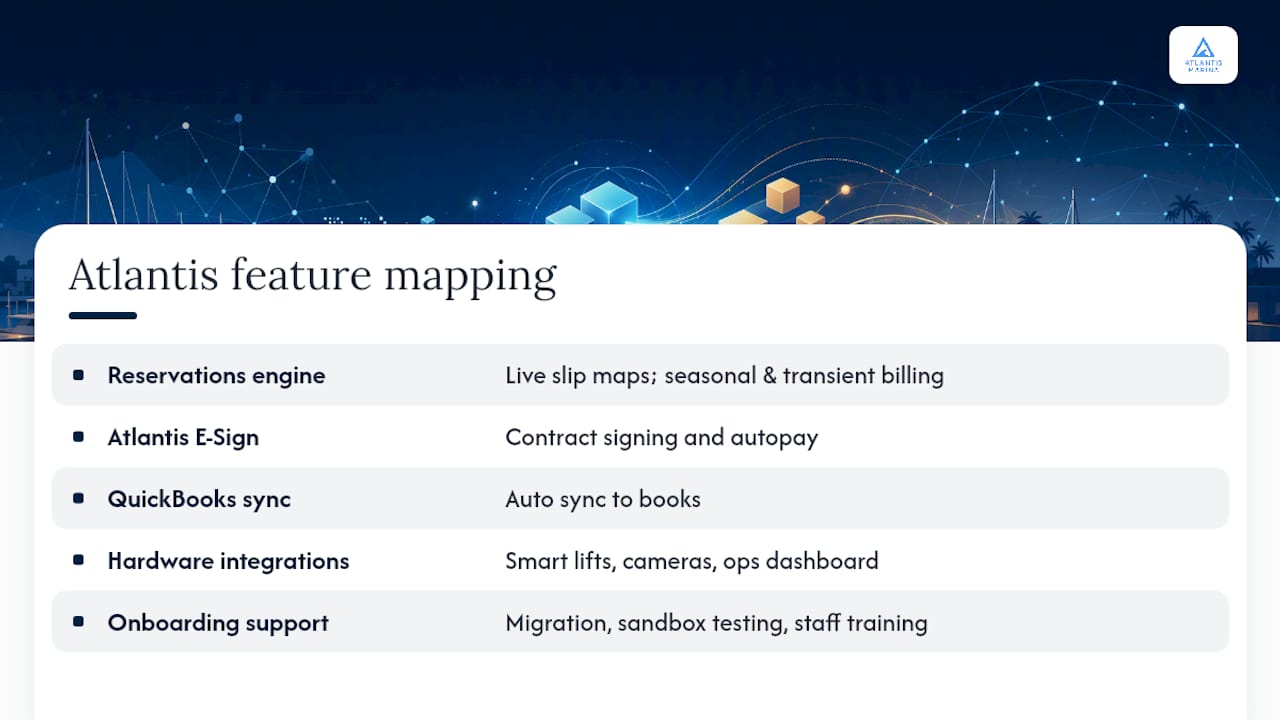
Every feature on the evaluation checklist above maps directly to something Atlantis Marina already runs in production. The reservations engine handles live slip maps and both seasonal and transient billing, autopay and Atlantis E-Sign cover contract signing and payment collection, and QuickBooks Online sync keeps your books current without manual entry. Smart lift control, camera integrations, and the operations dashboard round out the hardware side most legacy systems can't touch. Meanwhile, the Atlantis Boater App gives your customers self-service booking, document upload, and messaging in one account.
Onboarding includes migration assistance, sandbox access to test your data before go-live, and staff training hours built into the setup process, exactly the support gaps that derail most switches. Plans run across multiple tiers from entry-level to enterprise, with full pricing details available on the pricing page. If you're ready to see how your current setup compares, reach out through the sales team for a walkthrough built around your actual slip count and rate structure.
Sources
For deeper feature comparisons, Capterra's marine software listings break down reviewer priorities across dozens of platforms. RoverPass documents onboarding expectations for reservation-focused switches, and the National Marina Association offers broader operational best-practice guidance. For change-management advice from an adjacent industry, this club manager's migration guide covers similar ground from a reservation-software angle.
FAQ
How Long Does It Take to Switch Marina Software?
Most migrations take four to eight weeks from decision to full cutover, depending on data volume and integration complexity. A sandbox pilot phase before go-live typically adds one to two weeks but prevents far costlier errors after launch.
Will I Lose Historical Billing Data When I Switch?
Not if you export invoices, payment history, and contracts before migration and import them as read-only records. Vendors offering dedicated migration support typically build this into onboarding rather than leaving it to the operator.
What Does Atlantis Marina Cost Compared to Building a Custom Setup?
Atlantis Marina pricing includes multiple subscription tiers and a percentage-based platform fee on digital transactions; complete pricing information is available on the pricing page. Custom or fragmented legacy setups often cost more once you factor in separate POS, billing, and hardware tools that don't talk to each other.
Do I Need to Train Staff Separately from Boaters?
Yes. Staff training should happen in stages, admins first, then billing, then front-desk and dockhands, before boaters ever see the new system. Boaters typically only need a short onboarding email walking them through app signup and document upload.
What's the Biggest Mistake Marinas Make When Switching Software?
Rushing data migration without a sandbox test is the most common failure point. Skipping validation on vessel IDs, invoice history, and rate schedules leads to duplicate records and billing errors that surface weeks after go-live, when they're far harder to fix.