
A dock walk checklist works only when it's a standardized, severity-coded, timestamped mobile record tied directly to slip and tenant data, not a paper form stuffed in a clipboard. Every finding needs a photo and a severity tag so nothing gets lost in translation between shifts. Run it through marina management software and each flagged issue turns into a work order automatically, feeding the reports insurers and capital planners actually want to see.
TL;DR:
- Dock walk checklists must be standardized, severity-coded, timestamped, and linked to slip and tenant data to ensure accurate, actionable records.
- Mobile tools with photo documentation, automatic work order generation, and QR code linking streamline inspections and eliminate paper-based errors.
- Inspection frequency should be based on risk and traffic, with daily checks during busy periods, monthly system reviews, and annual deep inspections.
- Fuel docks require daily safety checks of shutoff valves, fire safety equipment, signage, and spill response readiness due to higher safety risks.
- Logged findings should include key details and be used to predict problems, with recurring issues informing capital improvements and maintenance planning.
Table of Contents
- What Belongs on a Routine Dock Walk Checklist?
- How Do You Run a Dock Walk With Mobile Tools?
- How Often Should Dock Inspections Happen?
- What Fuel Dock and Emergency Checks Belong on Every Round?
- Which Findings Should Trigger Preventive Maintenance?
- A Dockmaster's Take on Making This Stick
- How Atlantis Marina Turns Dock Walks Into Auditable Records
- Sources
- FAQ
What Belongs on a Routine Dock Walk Checklist?
Every dock round should hit the same visible, reachable points in the same order, every time. Consistency is what turns a walk-through into a data set instead of a vibe check.
The Wilson Management maintenance checklist lays out the core every-walk items that should anchor your routine:
- Decking condition: soft spots, splintering, or standing water pooling on boards
- Protruding fasteners: nails or screws backing out, a common trip hazard on aging docks
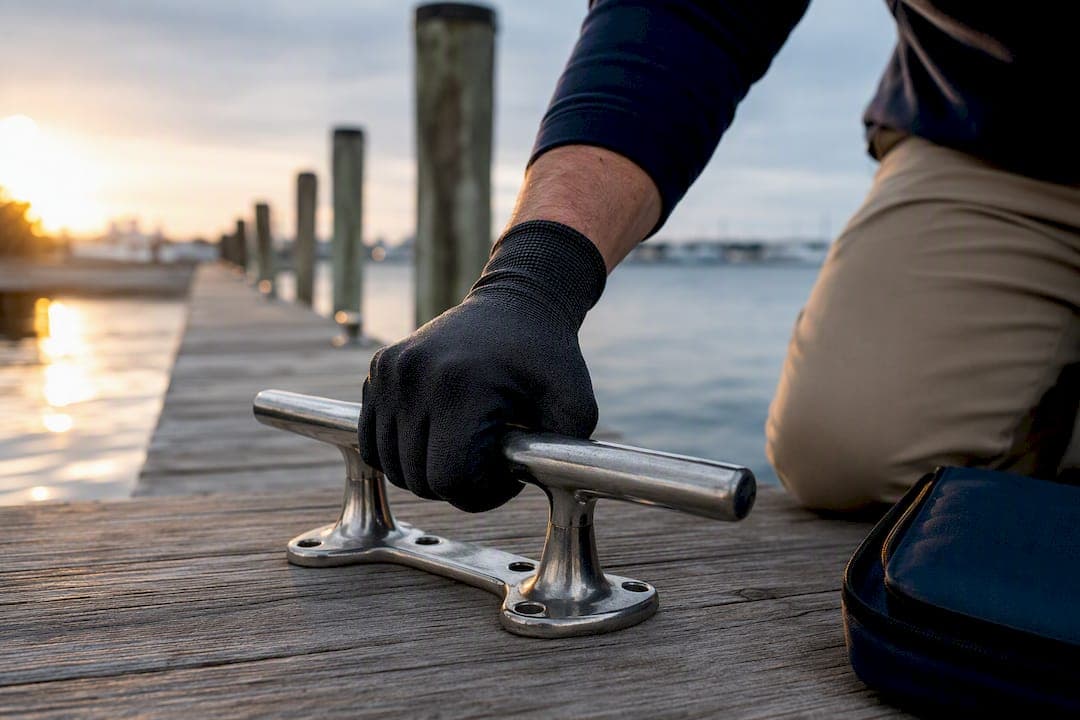
- Cleat security: base bolts tight, no cracking around the mounting plate
- Finger pier and gangway alignment: gaps widening, hinges binding, or ramps sitting at odd angles
- Ladders, gates, and handrails: rungs intact, gate latches functional, rails not wobbling
- Freeboard anomalies: a float sitting lower than its neighbors often signals water intrusion
- Loose gear and debris: lines, hoses, or trash left in walkways
Utility checks ride alongside the structural walk. Pedestal doors should close and latch, visible wiring should show no fraying or corrosion, shore power cords should sit off the deck surface, dock lighting should function at dusk, and fire extinguishers need to be present, charged, and unobstructed.
Not every item needs the same scrutiny. A cleat gets a tug test and a visual check on every pass. A pile showing new surface cracking gets flagged for a deeper probe by a contractor rather than a snap judgment on the spot. That distinction, quick functional check versus a flag for follow-up, keeps rounds fast without letting real problems slide.
Severity coding is what makes the difference actionable. A simple P1 through P5 scale works well: P1 is an immediate hazard (exposed wiring, a collapsed board), P2 is urgent but stable for a day, and P3 through P5 scale down to cosmetic or routine wear. P1 and P2 items should trigger an instant alert to a supervisor, not wait for end-of-shift paperwork.
Pro Tip: Assign a mandatory photo requirement to any P1 or P2 finding. It removes the "I'll describe it later" gap that turns urgent issues into forgotten ones.
How Do You Run a Dock Walk With Mobile Tools?
The mechanics of a software-integrated dock walk are simple once the checklist is built into a mobile app rather than a binder. Here's the sequence that keeps records clean and auditable:
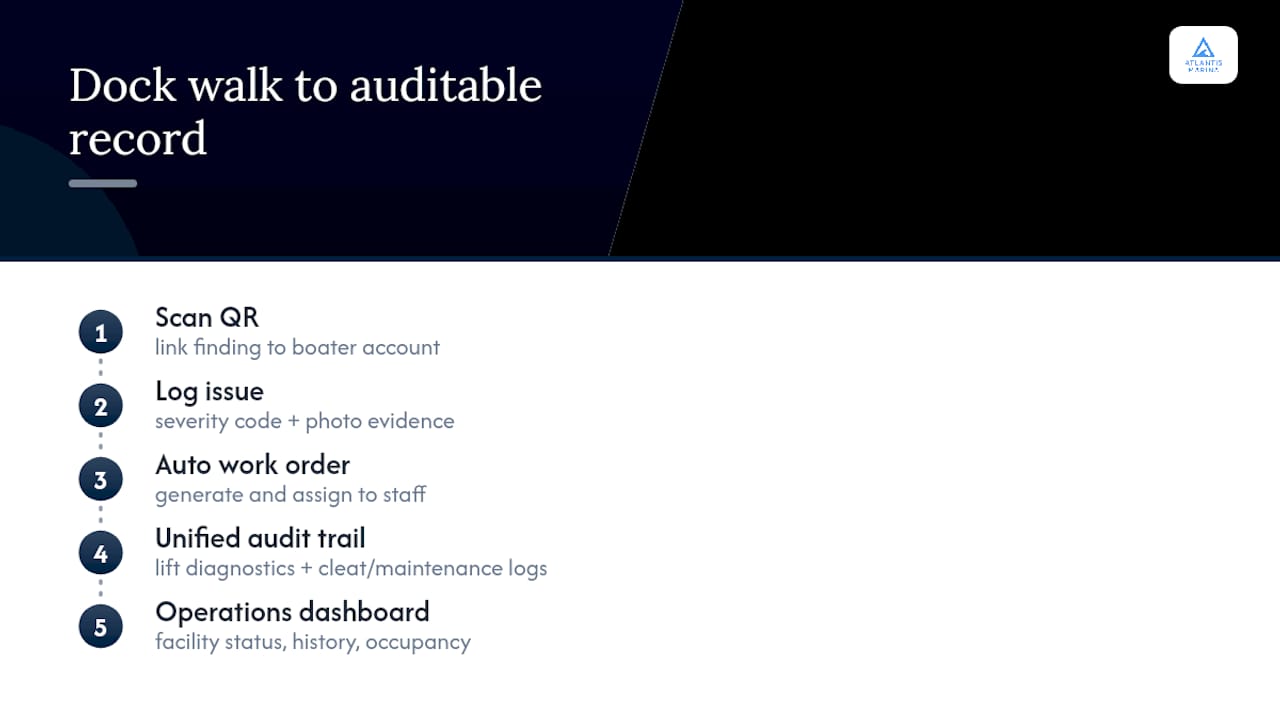
- Open the facility checklist on a phone or tablet and select the slip, or scan the account QR code posted at the pedestal to pull up the linked vessel and tenant record instantly.
- Capture a timestamped photo of any flagged item, tag it with a severity code, and add a short note. Two or three words is often enough. Detail comes later.
- Auto-generate a work order for anything above a minor severity threshold, or mark the item closed if it's a false alarm or a quick fix completed on the spot.
- Assign the work order to a trade or in-house staffer and set a service-level expectation based on the severity code.
- Route the closed item back through a verification step so a second set of eyes confirms the repair before the ticket disappears from the queue.
QR-linked passes remove the single biggest source of friction in dock inspections: figuring out which boat, which tenant, and which contract a hazard belongs to. Instead of cross-referencing a paper slip map, scanning the code pulls up the full account instantly. For hardware issues tied to boat lifts or electrical infrastructure, the Dealer Tool Kit gives field staff a way to run diagnostics on the spot and attach that data directly to the same work order.
Roles matter here. The inspector who logs the issue shouldn't be the same person who marks it resolved. A supervisor or a second technician should verify closure, and the platform should keep every timestamp, photo, and status change in an audit trail. That's what separates a quick mobile note from a record an insurer or municipal partner can actually use. Mobile-first tools like these are increasingly what dockmasters rely on to keep rounds fast without sacrificing documentation quality.
Pro Tip: Keep the digital form to one screen wherever possible. Staff compliance drops fast once a checklist requires scrolling through multiple pages for a routine pass.
How Often Should Dock Inspections Happen?
Frequency should scale with risk and traffic, not run on a single fixed schedule. A busy transient dock in July needs more attention than a quiet slip in a covered dry stack building in February.
A workable cadence looks like this:
- Every walk: the quick visual and functional pass covering decking, cleats, lighting, and fire equipment
- Daily, when occupancy or weather activity is high, particularly after storms or heavy traffic weekends
- Monthly, a more formal system check. One commonly cited 23-item marina safety inspection format takes roughly 30 to 45 minutes and covers dock structure, electrical, fire safety, and compliance categories together
- Annual, a deep inspection involving divers or structural contractors examining what a surface walk can't reach
Every logged entry should carry the same minimum fields: inspector name, timestamp, slip ID, photo, severity code, immediate mitigation taken, and a linked work-order ID if one was created. That structure is what makes the record usable months later.
Annual inspections deserve special weight because they create the actionable report that insurers, municipal partners, and capital planners actually review. A year's worth of consistent logging turns into a document that justifies budget requests instead of a vague sense that "the docks need work."
What Fuel Dock and Emergency Checks Belong on Every Round?
Fuel docks carry life-safety and environmental risk that ordinary slip inspections don't, so they need their own opening protocol every day the dock is active.
- Check shutoff valves and the emergency electrical shutoff to confirm both are accessible and functional before the first customer arrives.
- Inspect fire extinguishers, spill kits, and bonding or grounding continuity on fueling equipment, along with nozzle and hose condition for cracking or leaks.
- Verify signage, hydrant access, and life ring placement at the fuel dock specifically, since these areas see the highest foot traffic and highest consequence if something goes wrong.
The WorkProcedures marina SOP guide frames fuel dock checks as both a Coast Guard compliance matter and an insurer expectation. Spill response needs a clear chain: stage boom and absorbent pads before opening, know who gets notified first internally, and have a defined threshold for when a spill requires shutting the dock or calling local authorities rather than handling it in-house.
A 23-item dock safety checklist typically runs 30 to 45 minutes monthly. Fuel dock checks belong in that same rhythm, but daily, given the higher stakes of a missed valve or an expired extinguisher tag.
Which Findings Should Trigger Preventive Maintenance?
Dock walk data earns its value once it starts predicting problems instead of just recording them. Surface symptoms are early warnings for issues you can't see from the deck.
- Freeboard changes or float sag often indicate water intrusion inside a flotation unit long before the float visibly fails, and should trigger a diver inspection rather than a wait-and-see approach.
- Shore power and electrical systems need periodic review by a qualified electrical contractor, covering pedestal wiring, feeder lines, and breaker condition, not just the visual pass a dockmaster runs daily.
- Fastener and pile condition should be tracked over time, not just logged once. A pile that shows minor spalling this quarter and worse spalling next quarter tells a different story than either observation alone.
- Recurring findings feed the capital plan. If the same finger pier keeps generating P2 tickets, that's a repair to prioritize, not a maintenance line item to keep repeating.
An annual inspection report that documents deficiencies, code issues, and recommended timelines becomes the roadmap for that capital plan, and it's far more persuasive to a budget committee than a hallway conversation about "the docks needing work."
A Dockmaster's Take on Making This Stick
Adoption fails when the checklist tries to do too much. Keep the mobile form to one screen, make photos mandatory only for P1 and P2 items, and let staff add detail through a follow-up work order rather than a bloated initial entry. New hires learn faster shadowing an experienced dockmaster for two or three rounds than reading any manual, and building templates for recurring issues, like the same pedestal that always trips a breaker, saves everyone from re-describing the same problem every week. The platforms that work are the ones that get out of the way.
— John R
How Atlantis Marina Turns Dock Walks Into Auditable Records
Atlantis Marina replaces the clipboard entirely with a mobile checklist that's already connected to your slip map, tenant accounts, and billing records, so every finding from a dock round lands exactly where it belongs without double entry. Scan a boater's account QR code, log a severity-coded issue with a photo, and the platform can generate the work order automatically and assign it to the right staffer with a service window attached.
The Dealer Tool Kit extends that same workflow to smart boat lifts and connected hardware, so diagnostic data from a lift controller lands in the same audit trail as a cracked cleat. Facility status, maintenance history, and occupancy all live in one operations dashboard, which means the annual report insurers ask for practically assembles itself from months of logged rounds instead of a scramble in March.
If your dock walks currently live on paper or in a spreadsheet nobody updates consistently, visit the Atlantis Marina sales page to see the mobile checklist workflow and request a demo built around your facility's layout.
Sources
For fuel dock protocols and Coast Guard expectations, see the WorkProcedures SOP guide. For routine checklist scope and cadence, review the Wilson Management maintenance checklist and the POPProbe dock safety checklist. For annual inspection value to insurers, read Marina Dock Age's inspection guide. Always confirm NFPA 303, ABYC electrical standards, and local Coast Guard rules against your specific jurisdiction before finalizing SOPs.
- The Annual Marina Inspection: The First Line of Defense for Safety, Compliance and Insurability | Marina Dock Age
- Seasonal marina maintenance checklist for Puget Sound | Wilson Management
- Marina Dock Safety Inspection Checklist | POPProbe
FAQ
What Is a Dock Walk Checklist?
It's a standardized inspection list dockmasters use during routine dock rounds to record hazards, maintenance needs, and vessel or tenant issues, typically now run through mobile software with photo capture and severity coding.
How Often Should a Marina Perform a Dock Walk?
Quick checks happen on every walk, with daily rounds during busy periods, monthly formal system reviews, and an annual deep inspection involving divers or structural contractors.
What Should Be Logged During a Dock Inspection?
At minimum, log the inspector's name, timestamp, slip ID, a photo, a severity code, any immediate mitigation taken, and a linked work-order ID if one was created.
How Long Does a Standard Dock Safety Inspection Take?
A typical 23-item dock safety inspection takes about 30 to 45 minutes and is usually performed on a monthly basis by a marina manager.
Can Software Replace Paper Dock Walk Forms?
Yes. Platforms like Atlantis Marina let staff run the checklist on a phone, link findings directly to slip and tenant records via QR code, and auto-generate work orders instead of transcribing paper notes later.