

Integrated cameras are an operational platform for modern marinas, not just a security add-on. When tied into a unified marina management system, they deliver real-time security alerts, occupancy intelligence, and automated maintenance triggers from a single dashboard. The role of camera integration at waterfront properties has expanded well beyond perimeter monitoring: today's systems connect video events directly to slip management, access control, and staff workflows.
Three immediate benefits operators gain from full integration:
- Security: Fewer manual patrols, faster incident verification, and video evidence attached automatically to incident records.
- Operations: Occupancy monitoring for slip turn management and maintenance detection triggered by camera analytics.
- Guest experience: Remote vessel arrival verification and faster check-ins without staff walking the docks.
Your first step: run a site risk assessment, then schedule an integration review with your marina management vendor or in-house IT team.
Table of Contents
- Why camera integration matters for marina and waterfront operations
- What your integrated marina camera system actually needs
- How a marina camera deployment actually unfolds
- Best practices that keep your system reliable and alert fatigue low
- Turning video feeds into business intelligence and measurable KPIs
- What to require from vendors and integration partners
- How Atlantis Marina connects cameras to your operations
- ROI and cost considerations for camera integration projects
- Key Takeaways
- The case for treating cameras as an operations tool, not a security afterthought
- Atlantis Marina gives you a single platform for cameras and operations
- Useful sources and operator guides
- FAQ
Why camera integration matters for marina and waterfront operations
Integrated cameras cut staff footage review time and enable faster, verified responses to incidents. A standalone camera records; an integrated camera acts. When a perimeter alert fires at 2 AM, an integrated system pushes a video clip directly to the dockmaster's phone, logs the event, and can trigger a gate lock, all without anyone sitting in front of a monitor.
AI-powered video analytics automatically identify specific threats and send real-time alerts with video evidence to staff for immediate response, turning passive recording into active prevention.
The operational difference shows up in three concrete use cases. After-hours security alerts arrive with timestamped video evidence, eliminating the "he said, she said" problem during insurance claims. Occupancy monitoring feeds directly into slip turn management, so your team knows a transient berth opened up before a boater calls to ask. Maintenance detection catches broken dock lines, floating debris, and structural damage before a guest reports it or a vessel is damaged.
Professional site risk assessments and single-pane cloud dashboards are now the industry-standard starting point for any serious waterfront surveillance deployment.
What your integrated marina camera system actually needs
The system is the combination of marine-rated cameras, resilient networking, an analytics-capable video management system (VMS), and integration points to your marina management platform. Each component earns its place.
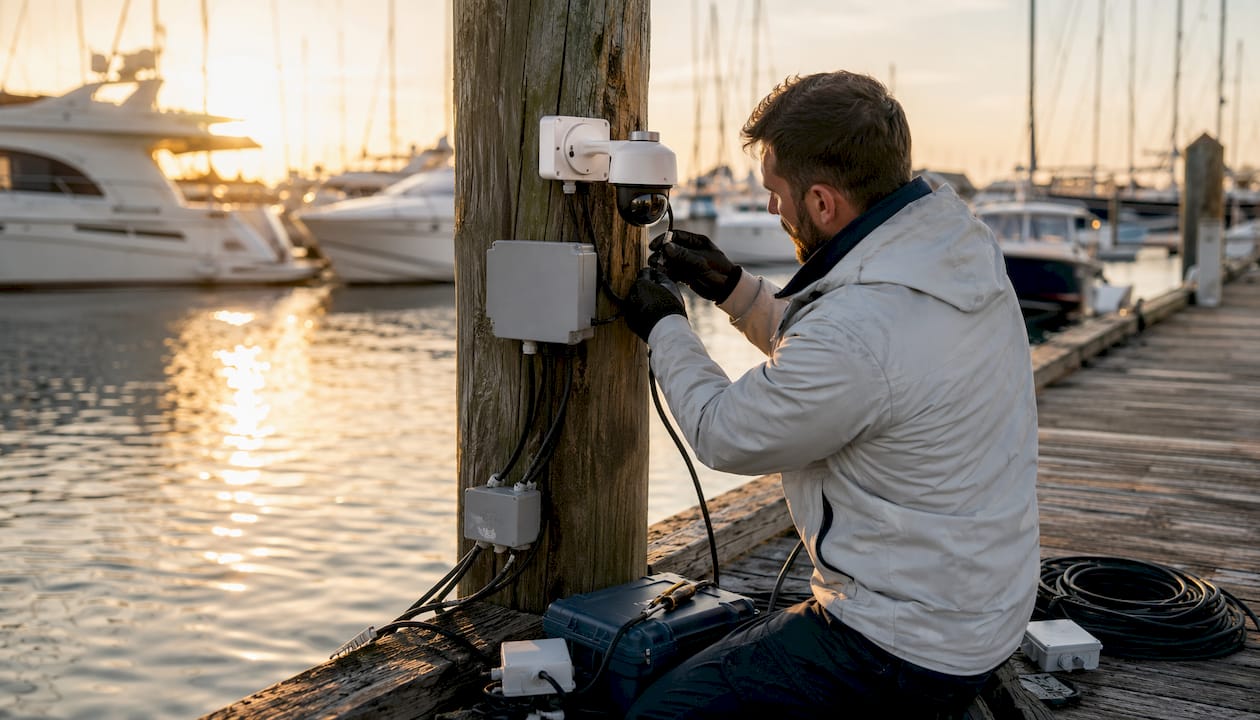
- Marine-rated cameras: Weatherproof housings with corrosion-resistant materials. Salt-fog exposure causes rapid hardware degradation; retail-grade cameras fail quickly in coastal environments.
- PoE switches and hardened cabling: Power over Ethernet simplifies installation and reduces failure points at dock-level runs.
- Network redundancy: WAN failover, mesh access points, and strategic outdoor AP placement. Enterprise-grade networking is required to reliably stream and integrate cameras across large waterfront properties.
- Cloud VMS or hybrid storage: Centralized video management with retention controls and remote access.
- AI analytics modules: Line-crossing detection, occupancy counting, and behavioral analytics that differentiate human threats from wave movement or floating debris.
- Access-control integration: Gate triggers, door locks, and lift controls tied to camera events.
- Alert and notification channels: Push alerts to mobile devices, email, or a Security Operations Center (SOC).
Pro Tip: Prioritize marine-rated equipment and sealed connectors at every junction box. A single unsealed connection in a salt-fog environment can corrode within one season and take down an entire camera run.
How a marina camera deployment actually unfolds
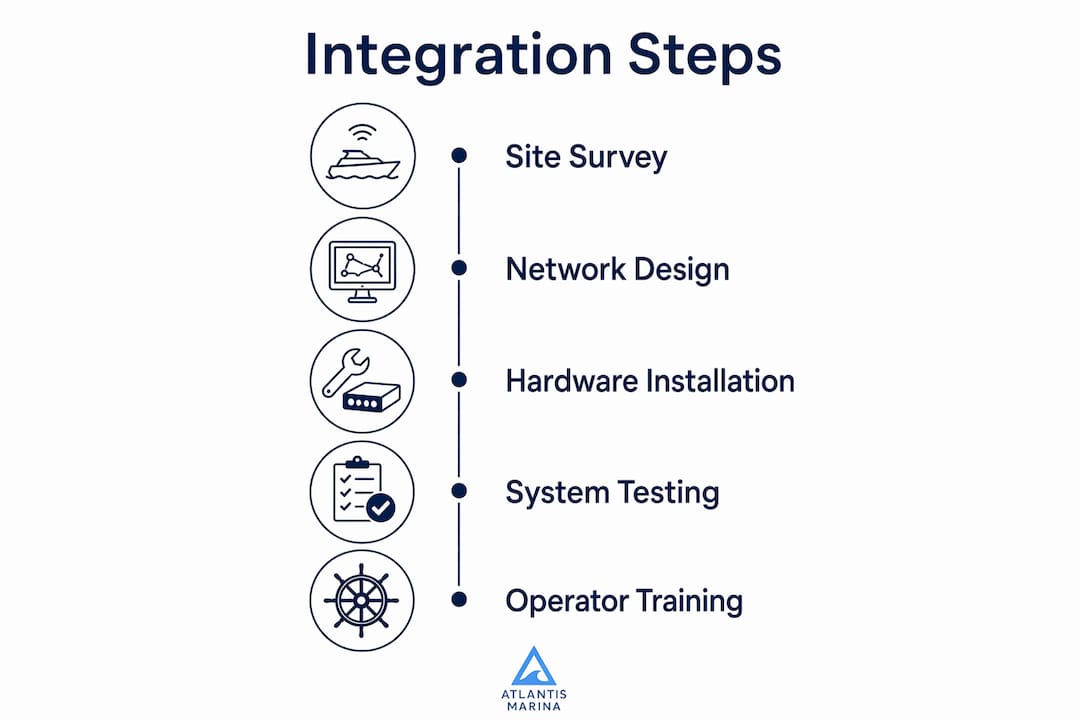
A repeatable five-phase deployment covers every project from a 50-slip community marina to a multi-property group: site survey and risk assessment, network design, hardware selection and procurement, staged installation and testing, and integration with staff training.
Deployment checklist operators should require from vendors:
- Conduct a formal site risk assessment with documented coverage maps and choke-point identification.
- Design pole and roof mount locations with overlapping fields of view at entry points, fuel docks, and slip rows.
- Route cabling through conduit rated for marine environments; plan for UV exposure on all above-deck runs.
- Design the PoE switch layout with redundant uplinks and UPS backup power at each distribution point.
- Specify analytics rulesets before installation: define line-crossing zones, exclusion areas for wave movement, and occupancy counting regions.
- Stage installation in phases, testing each camera segment before moving to the next.
- Configure VMS integrations, webhook endpoints, and alert routing to your marina management platform.
- Conduct staff training and a live simulation of the incident response workflow.
| Phase | Typical Duration |
|---|---|
| Site survey and risk assessment | a couple of weeks |
| Network design | about two weeks |
| Hardware procurement | several weeks |
| Staged installation and testing | a few weeks |
| Integration and staff training | up to two weeks |
Cost components span hardware and housings, mounts, PoE switches, cabling and conduit, installation labor, networking upgrades, cloud VMS subscription, analytics licensing, and optional SOC monitoring fees. The largest variance comes from legacy network upgrades and the number of camera positions requiring new conduit runs.
Best practices that keep your system reliable and alert fatigue low
Reliability comes from professional design, analytic tuning, and network redundancy, not from adding more cameras. A poorly tuned system with 40 cameras generates more noise than a well-designed system with 20.
Operators who get the most from their waterfront property surveillance systems follow a consistent set of practices. Perform a formal site risk assessment before purchasing a single camera. Use layered coverage with overlapping fields of view at choke points so no single camera failure creates a blind spot. Set analytics rules that trigger only on defined zones: line-crossing alerts work well at dock entry gates; avoid blanket motion detection across open water where wave action and boat wakes will flood your alert queue.
Schedule seasonal hardware inspections, particularly after major storms, and enforce firmware update discipline across the entire camera fleet. Cameras running outdated firmware are a security liability and often the source of false positives.
Pro Tip: Re-tune your analytics rulesets after every major weather event and monthly during peak season. Environmental conditions shift, and rules calibrated in March may generate significant false alarms by July when boat traffic and wake patterns change.
Privacy and regulatory compliance belong in your deployment plan from day one. Post visible signage at all camera coverage areas, configure privacy masking for any residential sightlines, and set retention policies that match your state's requirements. Several U.S. states have specific rules on video retention periods and notification requirements for commercial properties.
Turning video feeds into business intelligence and measurable KPIs
Cameras produce measurable signals: occupancy counts, dwell time, maintenance events, and access attempts that map directly to KPIs marina operators can track and act on.
Practical use cases:
- Transient slip occupancy monitoring: Know when a slip opens up and feed that data into yield management without a staff walkthrough.
- Dock condition alerts: Camera analytics flag broken lines, debris accumulation, or dock damage for maintenance scheduling.
- Unauthorized after-hours access: Verified alerts with video evidence support enforcement and insurance documentation.
- Vessel arrival verification: Confirm a boater's arrival remotely and trigger check-in workflows before they reach the office.
The AI marina operations use cases that deliver the clearest ROI are the ones tied directly to staff time savings and revenue recovery.
KPIs worth tracking:
- Average time-to-verify an incident (target: under 5 minutes with integrated alerts)
- Percent reduction in manual patrol hours
- Transient slip turn time improvement
- Maintenance incidents detected via camera versus discovered in-person
- False-alarm rate post-analytics tuning
| Dashboard Element | What It Shows |
|---|---|
| Live camera feeds | Real-time view of docks, gates, fuel dock, and entry points |
| Flagged incidents | Unreviewed alerts with video clips and timestamps |
| Occupancy heatmap | Slip utilization by zone, updated in real time |
| Recent alerts and confirmed actions | Staff-verified events with resolution notes |
| Maintenance triggers | Camera-detected dock conditions awaiting work orders |
A single-pane operations dashboard that surfaces all five of these elements gives dockmasters the situational awareness to manage a facility without constant physical walkthroughs.
What to require from vendors and integration partners
Require marine-grade hardware specs, network design documents, API availability, documented analytics accuracy, and defined support SLAs before signing any contract.
Integration checklist for RFPs and vendor evaluations:
- Native or documented API for camera/VMS to marina management platform integration
- Event webhook support for real-time alert routing
- Time-synced evidence export compatible with your incident management workflow
- Access-control triggers (gates, lifts, doors) tied to camera events
- Cloud storage retention controls with configurable retention periods
- SOC escalation options with defined response time SLAs
- Salt-fog and IP/IK ratings for all outdoor hardware
- MTBF data for camera models proposed
- Analytics false-positive rate benchmarks from comparable deployments
- Integration reference implementations at similar marina or waterfront facilities
- Network redundancy design documentation
- Sample incident response workflow showing the full alert-to-resolution path
How Atlantis Marina connects cameras to your operations
Atlantis Marina connects camera events to operational workflows via documented integrations and a unified operations dashboard, turning video alerts into assigned tasks rather than unreviewed footage.
Platform capabilities for camera integration:
- Event webhooks that push camera alerts into the operations dashboard in real time
- Live-feed embeds within the unified marina management view
- Automated incident evidence attachments to work orders and maintenance logs
- Atlantis Bot AI assistance routing verified alerts to the right staff member with suggested next actions
- Mobile alerting to dockmasters via the Atlantis platform
- Support for camera hardware integrations including Eagle Eye Networks and compatible VMS platforms
Integration workflow example:
- Camera detects a perimeter breach at a dock gate after hours.
- AI analytics flag the event and push an alert with a video clip to the Atlantis operations dashboard.
- The dockmaster receives a mobile push notification with the clip and location.
- Staff confirms the event via the mobile app.
- The platform logs the incident, attaches the video evidence to a security record, and triggers a follow-up action (gate lock, SOC notification, or maintenance work order).
The Marina Camera Integration Walkthrough provides step-by-step implementation detail for operators ready to configure this workflow. The marina management platform ties camera events to slip assignments, billing records, and access control in one connected system.
ROI and cost considerations for camera integration projects
ROI typically comes from reduced patrol hours, fewer theft and vandalism losses, improved slip turns, and deferred manual inspections. Payback often falls in the range of months to a few years depending on project scope.
Conservative ROI example for a small marina (50 slips):
- Patrol labor reduction: 10 hours per week at $25/hour = $13,000/year saved
- Vandalism and theft loss reduction: estimated $5,000/year based on documented incident history
- Transient revenue gain from faster slip turns: 2 additional transient nights per week at $75/night = $7,800/year
- Total estimated annual benefit: ~$25,800
Cost components to budget:
- Cameras and weatherproof housings
- Mounts, poles, and conduit
- PoE switches and cabling
- Installation labor
- Networking upgrades (access points, fiber, WAN)
- Cloud VMS and analytics subscription
- Optional SOC monitoring fees
Payback time shortens with grant funding (several U.S. coastal states offer marina infrastructure grants), bundled hardware discounts from platform vendors, and phased deployments that prioritize high-value zones first. Large bespoke installs requiring full network rebuilds or legacy infrastructure replacement extend payback to the higher end of the range.
Key Takeaways
Integrated cameras deliver security, operational intelligence, and measurable ROI when deployed with marine-rated hardware, a redundant network, and a direct connection to your marina management platform.
| Point | Details |
|---|---|
| Start with a site risk assessment | Map coverage zones and choke points before purchasing any hardware. |
| Use marine-rated hardware only | Retail-grade cameras fail rapidly in salt-fog environments; specify IP/IK ratings and sealed connectors. |
| Design for network redundancy | WAN failover and hardened outdoor access points prevent camera blackouts during storms. |
| Tune analytics and train staff | Re-calibrate rulesets after weather events and monthly during peak season to keep false-alarm rates low. |
| Track KPIs from day one | Monitor time-to-verify incidents, patrol hour reductions, and transient slip turn time to measure ROI. |
| Atlantis Marina unifies the workflow | The platform connects camera events to slip management, maintenance logs, and mobile alerts in one dashboard. |
The case for treating cameras as an operations tool, not a security afterthought
Most marina operators I speak with installed their first cameras reactively, after a theft or a liability claim. That origin story shapes how they think about the system: footage you pull after something goes wrong. The operators who get the most value have flipped that model entirely. They treat camera feeds the way they treat occupancy data, as a live operational input that informs decisions before problems develop.
The shift is not complicated, but it does require intentional integration. A camera that sits on a standalone DVR contributes nothing to your slip management workflow. The same camera, connected to your marina management platform with a defined analytics ruleset and a mobile alert path, becomes a dockmaster's eyes on the water at 3 AM. That difference in value is entirely a function of how the system is wired together, not how many cameras you have.
Atlantis Marina gives you a single platform for cameras and operations
Atlantis Marina is the direct path from camera hardware to operational intelligence for marina operators who want more than a standalone surveillance system. The platform ties camera and sensor integrations to slip assignments, maintenance workflows, mobile alerts, and AI-assisted staff routing in one cloud-based dashboard, so your team responds to verified events rather than reviewing hours of footage.
Ready to see how it works for your facility? Schedule a demo and walk through the Marina Camera Integration Walkthrough with the Atlantis team. You will leave with a clear picture of what integration looks like for your specific dock layout and operational needs.
Useful sources and operator guides
Atlantis Marina operator guides:
- Marina Camera Integration Walkthrough for Managers — step-by-step implementation guide; best starting point for procurement and configuration.
- Marina Camera Security — platform capabilities overview for camera and sensor integrations.
- Marina Management Solution — single-pane workflow, billing, and device integration reference.
- Smart Marina Mobile Alert System Types for Dockmasters — alert delivery patterns and verification workflows.
- Aux Device Control for Marina Automation — gate, lift, and auxiliary device triggers from platform events.
Industry references:
- Coram AI: Commercial Security Systems — AI analytics performance benchmarks; best for evaluating analytics accuracy claims in RFPs.
- Overton Security: Property Manager's Guide to Camera Coverage — professional design standards and SOC integration guidance; best for network and coverage design.
- Basco Security: Dock Property Camera Installations — hardware specifications for marine environments; best for procurement specs and IP/IK rating requirements.
FAQ
What is the role of camera integration at waterfront properties?
Integrated cameras connect video feeds to operational workflows, delivering security alerts, occupancy data, and maintenance triggers through a unified marina management platform rather than functioning as standalone recording devices.
How does camera integration enhance marina operations beyond security?
When connected to a cloud-based platform, cameras provide occupancy monitoring for slip turn management, dock condition alerts for maintenance scheduling, and vessel arrival verification that speeds up check-in workflows.
What hardware specifications should marina operators require for waterfront cameras?
Specify marine-rated housings with sealed connectors, high ingress protection, and IK-rated vandal resistance. Retail-grade cameras degrade rapidly in salt-fog environments and typically fail within one season on coastal docks.
How long does a marina camera integration project typically take?
A full deployment covering site survey through integration and staff training typically runs a few weeks to several weeks, with hardware procurement being the most variable phase.
How does Atlantis Marina support camera integration for operators?
Atlantis Marina connects camera events to operational workflows via event webhooks, live-feed dashboard embeds, mobile alerts to dockmasters, and AI-assisted routing through Atlantis Bot, with step-by-step guidance available in the Marina Camera Integration Walkthrough.